French version available on LinuxFr.org.
Comments can be posted on LinkedIn.
Introduction
If you believe LinkedIn gurus, AI is the new technological revolution, the new gold rush, and so on. Soon, software engineers will no longer be needed!
And if you believe my YouTube recommendations, AI is the latest trendy scam, an unprecedented economic bubble inflating, and an ecological disaster ¯\(ツ)/¯.
In any case, in IT professions, the subject has become difficult to avoid.
For my part, after examining the problem, I reached the following personal conclusion: It’s a new tool, nothing more, nothing less. The challenge is to find how to best use it. And as an old communist bearded penguin, that means finding the most open-source tools possible and figuring out how to self-host the beast.
Moving forward, I will focus specifically on LLMs. Towards the end, I will quickly circle back to image generation AIs.
Some Definitions
- AI: encompasses all algorithms capable of performing tasks usually associated with human intelligence (playing chess, finding a path in a maze, speaking, drawing, etc.).
- ML: Machine Learning. Algorithms capable of learning from example data. These algorithms are a subset of AI.
- Neural Networks: a subset of machine learning, where an attempt was made to imitate human neurons, where it probably failed, but which still produced usable results (a successful failure! ^^).
- LLM: Large-Language Model. Basically, an AI that talks. These are a subset of neural networks.
- Generative AI: an AI that draws, makes videos, music. In short, everything except text. This is also a subset of neural networks.
- token: a word, or a syllable, or a symbol. To simplify to the extreme, one can consider that the number of tokens is the number of words.
- Context: the ongoing discussion between an LLM and a user.
- Agentic Programming: programming assisted by an LLM.
- Vibe-coding: the same thing, hands-free, at over 130km/h.
- Inference: basically, the use of the LLM.
- Training: the creation of the LLM, based on (many) examples.
Why Self-host?
Faced with this question, spontaneously, like a modern-day William Wallace, I would be tempted to answer by screaming “for freedom!!”. But in itself, that’s not very constructive. So let’s be more constructive:
Respect for Your Privacy
By self-hosting and using open-source software, you are guaranteed that your exchanges will remain confidential.
Unfortunately, I know that nowadays many people don’t care, just as many people don’t understand the concept of herd immunity…
The Cost of Cloud APIs
To put it bluntly, cloud APIs are horribly expensive.
I use them occasionally. I go through openrouter.ai to have a wide choice of providers and models.
The billing for these APIs is per token (extreme simplification: we pay per word). Except that a token, as we’ve seen, is a bit of a blurry concept. So, in terms of transparency, it starts off poorly. Worse, each API uses its own tokenizer. Therefore, it’s difficult to determine exactly how they count tokens.
Then, for agentic programming type use, token billing adds up quickly.
To this, I’ve already been told “but just take a subscription, it’s much cheaper!”
Cloud Subscriptions
And indeed, it is much cheaper. Comments I’ve seen on the internet suggest that some have gone from several hundred dollars/euros of APIs each month to subscriptions of 20~90€/month. Generally, it would be 2 to 5 times cheaper. In short, it’s so much cheaper that it quickly becomes suspicious.
1st problem: subscriptions don’t let you use the APIs. So you are stuck with your provider’s frontends: their web interface (chatgpt.com, claude.ai, etc.), their agentic programming tool (Claude Code, Mistral Code, etc.), etc.
The 2nd problem is that API prices likely reflect the true cost of LLMs. LLM subscriptions are therefore not expensive enough. Like ISPs, they potentially bet on the fact that some users make little use of their subscription to compensate for those who use it a lot. But currently, AI usage is increasing sharply. I think there’s little chance this idea will hold, and therefore I think they will be forced to sharply raise subscription prices, or continue to lower usage caps.
The 3rd problem is that usage caps are already quite low.
Access to Specialized Models
Cloud LLMs are most often general-purpose LLMs. But specialized models exist (fine-tuned). Some are specialized for programming, for playing the role of an assistant, for role-playing, for OCR, etc.
And you know the principle: as soon as a new technology appears, the first question many people ask is “how can we use it for sex?”. So naturally, we also have uncensored variants, notably used for erotic role-playing ^^.
Very few of these specialized models are accessible via API. Practically none are via subscriptions.
The only option is to run them yourself.
Ecology, Economy, All That?
It is difficult to find official figures regarding the impact of cloud LLMs. But as we will see later, these are huge general-purpose LLM models, and therefore necessarily greedy, even if shared. And given the construction of datacenters all over the world, well, it’s not great.
On the self-hosting side, it is not shared. And as we will see, you need graphics cards, and not just any graphics card.
In the end, I won’t risk comparing the two.
Open-source and Open-weight
Since the word “opensource” is now part of the marketer’s vocabulary, many AI developers claim their AI is opensource. However, they only provide the pre-trained model (its architecture and weights), but not its training data. Therefore, unlike opensource software, they do not provide all the material necessary to rebuild the final binary from “its sources”.
The OSI has therefore ruled: for an LLM to be considered opensource, it must be provided with its training data, or a sufficiently detailed description to allow reproduction. The vast majority of models available on ollama.com, huggingface.com, etc., are therefore actually open-weight, and not opensource.
However, it’s not all bleak: even if it’s not possible to reproduce their training from scratch, it is possible to fine-tune them. It is also possible to take their architecture and train them from other datasets.
Note that this changes nothing in terms of data confidentiality: a model can strictly do nothing without the assistance of its inference engine and its frontend. For example, it is therefore impossible to hide spyware in it. If an LLM leaks your data, it’s because your frontend gave it the tools to do so.
How to do it?
The recipe for a self-hosted LLM is:
- a large dose of graphics card,
- a perfectly seasoned LLM model,
- a spoon of LLM inference engine,
- and a pinch of frontend
Why the graphics card is super duper important?
The CPU is a relatively general-purpose chip optimized for low latency. The GPU (the graphics card processor) is a chip specialized in massively parallelized computation.
Basically, if computation were material transport, the CPU is somewhat equivalent to a racing car, whereas the GPU is a truck. And AI needs trucks.
Choosing Your Hardware
Consequently, the most important point for LLMs, by far, is the VRAM: the graphics card’s RAM. The size of the VRAM will determine the size of the LLM you can use. If you try to load an LLM that is too big for your VRAM, most inference engines will let it overflow onto the CPU and RAM. Initially, it will work, but performance will collapse very quickly.
To save some people time: below 12 GB of VRAM, you will probably achieve nothing truly useful with LLMs.
Note that your VRAM bandwidth is also important: the more bandwidth you have, the faster your model will execute. The cores obviously also matter, but experience tends to show that memory bandwidth is a better indicator of a card’s potential performance.
You can opt for Nvidia, AMD, or Intel graphics cards:
- Nvidia: these are generally the best supported. May require the installation of CUDA on your machine.
- AMD: fairly well supported, although not as much as Nvidia. May require the installation of Rocm on your machine.
- Intel: the least well supported currently. Most projects now handle them, but their configuration is likely to be more complicated, and new features and optimizations are likely to arrive later.
Choosing the Inference Engine
The inference engine is the software that runs your model. To my knowledge, the vast majority of inference engines are opensource.
In self-hosting, the most common are the following:
llama.cpp
It is, to my knowledge, the most common inference engine. But it is just a C++ library, therefore difficult to use as is :-)
Ollama
The simplest to use, but not the best. It is built around llama.cpp. It offers a command-line tool inspired by Docker.
It can use all the models from ollama.com, and it can, theoretically, use those from huggingface.com. In practice, for those from huggingface, it’s not simple.
I used Ollama for a long time, but the latest versions are proving to be more and more disappointing. Notably, the latest models take an eternity to load on my setup. Moreover, they push more and more for their cloud offers, which is really annoying.
llama-server and llama-swap
llama-server is a web server that wraps llama.cpp. It offers good performance.
It can use any model in GGUF format from huggingface.com.
However, it can only handle one model. If you want to switch to another model, you have to reconfigure it.
llama-swap is a wrapper around llama-server. It allows exactly that: switching transparently from one llama-server configuration to another (and more).
vllm
This is an inference engine .. not linked to llama.cpp at all :-).
It is known for being one of the most performant, if not the most performant. But like llama-server, it can only handle one model at a time. It also has stronger hardware constraints. For example, it is not at all a fan of asymmetric graphics card configurations like mine (different types of cards mixed).
My Recommendation
Currently, I recommend llama-swap.
Docker?
Personally, I run my inference engines in Docker.
I use Nvidia hardware. And in the case of Nvidia hardware, Docker complicates more than it simplifies (you still have to install CUDA, and you have to install nvidia-container-toolkit). However, it still allows switching from one engine to another easily, and not messing up the host system.
In the case of AMD (Rocm) and Intel (sycl) cards, I wouldn’t be surprised if Docker simplifies things quite a bit. Unless I’m mistaken, there’s no need to install Rocm on the host system. You just need to pass the devices into the container, and each container integrates the version of Rocm/Sycl it needs.
Choosing Your Model
The model is the heart of the neural networks. It’s a big binary blob, which contains the values representing the neurons and their synapses.
Your hardware may allow a certain model size, and your usage and hardware may allow certain operating modes.
Model Size
Now we get to the heart of the matter.
I will oversimplify to the extreme: Each model has its own specifics. But here, it’s just about providing benchmarks.
The characteristics that determine size are mainly:
- the number of parameters
- quantization
The number of parameters is currently in billions for self-hosted models (cloud models hit trillions). This gives an idea of the amount of knowledge stored in the LLM, but also more or less of its reasoning capacity (« warning, this is hyper approximate!). Billion is abbreviated as b in English. So classic sizes in self-hosted LLMs are, for example, 3b, 14b, 27b, 35b, etc.
Quantization is the size of each parameter in memory. The classics are:
- fp16: max precision. 2 bytes per parameter
- q8: 1 byte per parameter
- q4: 1 byte for 2 parameters
Then there are further variants in quantizations (S, M, XL, etc.), but I won’t detail those.
Basically, fp16 consumes lots of VRAM, but it’s the variant that will hallucinate the least. q8: we’re talking about 99% precision compared to fp16. It’s generally sufficient to have a good result. q4: we’re talking about ~97% compared to fp16. q4 works, but we sometimes have surprises.
There are quantizations below q4, but I won’t even mention them since the results are mediocre.
Note that, from experience, the more parameters a model has, the more tolerant it will be to quantization. For example, a 70b in q4 will probably be as usable as a 14b in q8 (rough estimate pulled out of my magic hat).
And so, we can roughly estimate the VRAM size of the model:
number of parameters × (quantization / 8)
Context Size
But that’s not all! The context must also be stored in VRAM. In other words, the discussion that the user and the LLM are having. This context is stored in the “KV cache”. For performance reasons, we must determine the maximum context size from the start.
Estimating the VRAM consumption of the KV cache is very delicate and depends on the model. The simplest thing, in my opinion, is just to try and see if it fits.
It is quantized to fp16 by default, but inference engines now allow reducing this. Personally, I set it to q8.
You also have to remember to activate “Flash Attention”. It’s an optimization that considerably reduces the size of the KV cache for models that support it. Soon, a new optimization, “TurboQuant”, should also arrive.
A large context is particularly necessary in agentic programming (opencode, etc.): at least a context of 64K, or even 128K, is needed for it to be usable (otherwise it will constantly recompress the context). I suspect that this is also particularly useful for role-playing with SillyTavern. Most modern models support at least 128K, so the limit will clearly be on your VRAM side.
Note that, by default, Ollama uses a small context of max 4K or 8K if I remember correctly. Sufficient for a simple discussion. Insufficient for everything else. It therefore needs to be adjusted.
And watch out for overflows! The effect on performance is insidious: if there is overflow onto RAM+CPU, a short discussion will only use a small part of the KV cache, and thus performance will only be slightly degraded. However, the degradation will amplify severely with the size of the context.
For reference, I have 16+16+12GB of VRAM, and I just barely fit qwen3.6-35b-a3b in q8 with 128K context.
Model Speed
Besides the size of the model itself, there are two characteristics that play a big role in its execution speed:
Thinking Models
You’ve probably already seen LLMs display “Thinking …” or something similar. And you’ve seen that we can examine what they “think”. These are so-called thinking models.
Studies show that these models give better answers. However, they naturally take more time to answer (and consume more tokens if you use an API .. eh, of course it’s billed!).
Dense Models or Mixture of Experts (MoE)
In the beginning, there were only dense LLMs: when a request is sent to them, a large part of the neural network is used. Then came the MoEs (Mixture of Experts).
One of the first usable open-weight MoEs is mixtral, from Mistral (proudly French! :)
An MoE LLM is actually a set of specialized sub-LLMs (“experts”). It’s a first neural network that decides which other LLM to send the request to.
The advantage: only a sub-part of the LLM is active at a time. The GPU has significantly fewer calculations to do. They are therefore significantly faster.
The disadvantage: the experts are relatively small, their knowledge is less interconnected, so they are potentially dumber.
Example:
- qwen3.6-27b is dense
- qwen3.6-35b-a3b is an MoE, with max 3 billion parameters active simultaneously (in other words, experts of 3 billion parameters)
Other Characteristics
Instruct Models
Models trained to follow instructions quickly .. and therefore not to think too much. You will therefore rarely see models tagged as both instruct and thinking.
Tool Support
Models tagged “tools” or “tooling” are models trained to read and emit well-formatted JSON. The frontend can provide them with tools, in the form of a JSON manifest. LLMs can then use them by emitting, in JSON form, instructions that will be interpreted by the frontend.
Modern models (in other words, those less than a year old .. ^^) almost all support the use of tools.
This is absolutely necessary for agentic programming, home automation, etc.
Model Specialization
Self-hosted LLMs are very limited in size. There are therefore choices to be made about what they are taught.
Examples:
- ministral-3 is a generalist, but knows how to follow instructions and use tools (my favorite for Home Assistant)
- qwen3-coder is specialized in programming
- qwen3.6: a generalist, but with a strong emphasis on code and agentic programming. It handles this very well. It’s probably the best self-hostable model for this currently.
- gemma4: a generalist, but with an emphasis on multi-modal (image, audio, etc.)
Choosing Your Front-end
Here, there’s nothing particularly to know.
A brief quick list of some nice opensource frontends:
- open-webui or LibreChat: web interfaces just to chat with an LLM
- SillyTavern: a web interface for role-playing with an LLM
- opencode: a tool for agentic programming
All-in-ones
To simplify use, there are programs that do everything or almost everything in one block. For example:
- gpt4all
- lm-studio (warning, closed-source!)
The Importance of Execution Speed
There are essentially two speeds to take into account:
- the prompt reading speed (prefill)
- the token generation speed (prediction)
Both are expressed in tokens per second.
The first tells us how long it will take the LLM to take into account a new user input. But beware! If you lose the KV cache (for example, if you resume an old discussion), this speed also tells us how long it will take the LLM to rebuild it.
The 2nd tells us how fast the LLM will answer us.
And for some uses, the execution speed of the LLM is very important. This is particularly evident with agentic programming.
Typically, in agentic programming, it is considered that the LLM is tedious to use if it cannot answer more than ~10 tokens per second (more if it’s a thinking LLM).
Still in agentic programming, when you reach the limit of your context (one can quickly reach >128,000 tokens), the frontend must ask the LLM to compact the context. In other words, it asks it to summarize everything that has been said so far. As a result, the LLM must generate a large block of text, invisible to you.
Equally annoying: in the morning, when you want to resume your session from the day before, the LLM must rebuild its KV cache entirely. Imagining that your context was then close to 128K tokens, if your GPU and model can reread:
- 1000 token/s: 2 minutes to restart your session!
- 200 token/s: 10 minutes to restart your session!!
Example: llama-swap configuration
llama-swap allows switching from one LLM to another, but it can also juggle with any other software providing an OpenAI-compatible API. This notably includes stable-diffusion.cpp (inference engine for generative image AI).
Here is the configuration I use on my Debian machine, with Nvidia cards (16GB + 16GB + 12GB of VRAM).
CUDA and Nvidia Container Toolkit
You need to install:
Dockerfile
The official Docker image of llama-swap:cuda does not (yet) include stable-diffusion.cpp. I added it myself.
FROM nvidia/cuda:12.9.1-devel-ubuntu24.04 AS builder

RUN apt-get update && apt-get install -y --no-install-recommends \
      git build-essential cmake ca-certificates \
 && rm -rf /var/lib/apt/lists/*

RUN git clone --recursive https://github.com/leejet/stable-diffusion.cpp /tmp/sd

RUN cmake -S /tmp/sd -B /tmp/sd/build \
      -DSD_CUDA=ON \
      -DSD_BUILD_SERVER=ON \
      -DCMAKE_BUILD_TYPE=Release \
 && cmake --build /tmp/sd/build --config Release -j"$(nproc)"

FROM ghcr.io/mostlygeek/llama-swap:cuda

COPY --from=builder /tmp/sd/build/bin/sd-server /usr/local/bin/sd-server
Point of vigilance: you must use exactly the same CUDA image to build stable-diffusion.cpp as the one used by llama-swap.
docker-compose.yml
|
|
config.yaml
The configuration of llama-swap.
Allows having:
- simultaneously active Gemma4 on 2 of my GPUs, and stable-diffusion.cpp on the 3rd GPU
- or any other LLM, but one at a time
|
|
Does it fit?
llama-swap has a web interface. Connect to http://localhost:8080.
In this interface, you can access the logs of the “upstream” (llama-server, stable-diffusion.cpp, etc.). If you filter the logs for “GPU”, you will be able to see if your model fit entirely in VRAM, or if it overflowed onto RAM.
Concrete Uses and Limits
As we’ve seen, the only real limit is actually your hardware. In theory, nothing prevents you from running Kimi K2.5. You just need 1.5TB of VRAM :-)
But in reality, most of us will manage at best between 24GB and 42GB of VRAM. What I describe below corresponds to my experience, with my 3 graphics cards.
Vibe-coding
TL;DR: Meh, not really.
Model I currently recommend: qwen3.6, or much larger. q8 at minimum.
With my VRAM, I can run the qwen3.6 model, in q8 version, 27b or 35b-a3b, with a context of 128K.
From my point of view (totally subjective and not properly benchmarked), this model gives code roughly as good as Claude Sonnet 4.5. In other words, the code works, but it’s crap. As soon as we look under the hood, we realize the code is messy. This is particularly accentuated if, like me, you are the type to change your mind. The LLM is incapable of taking a step back and saying “hey wait, so we could simplify all this”.
Another problem: the context. In self-hosted, you will work with a smaller context. Smaller context means more context recompression. More context recompression means more loss of information. And before you understand what’s happening, the LLM will have forgotten key instructions.
Some will tell me that it can be mixed. For example, with memory mechanisms, by throwing more hardware at the problem, or … by using a cloud LLM like Claude Opus 4.7.
But generally, I find that LLMs (including cloud LLMs) code like interns who have just finished their studies, have an incredible amount of knowledge, but have just as much common sense as a flat tire.
And even putting these problems aside, personally, I also see fundamental problems in vibe-coding, which are more human in nature:
In the end, it’s my name that will be on this code. It’s me, the human being, who will have to take responsibility for it. So I must at least read it correctly.
I experimented with vibe-coding for 2 weeks for personal reasons, with qwen3.6 and Claude Sonnet 4.5. My conclusion is that vibe-coding quickly becomes addictive … and lazy. Vibe-coding allows having visible results, much faster. And so it allows getting your dopamine dose, much faster. I tried to force myself to read the generated code carefully, but the reading created friction, and put itself between me and my dose. I surprised myself by reading too quickly and missing plenty of errors.
Moreover, I felt my experience slipping through my fingers. Experience must be maintained. In other words, if I no longer forge, soon, I will no longer be a blacksmith.
Code Review
TL;DR: Yes.
Model I currently recommend: qwen3.6
Personally, I’ve always been more of a fan of the idea of AIs that assist humans rather than AIs that replace them completely. So instead of vibe-coding, I decided to opt for another approach. I use LLMs to review my work. Sometimes, when I use a technology that I master little, I question them as well, as I question Google. Sometimes, I ask them for a suggestion. But it’s always me who writes the final code. It takes more time, but I find it more satisfying and more constructive.
And qwen3.6 knows how to do this very well.
A cloud LLM will probably be able to identify “broader” problems than qwen3.6. But overall, qwen3.6 is sufficient for me for this.
Translation
TL;DR: Yes.
Model I currently recommend: any of them
A large part of the translation problem is solved by vectorization and deverctorization, upstream and downstream of the LLM. For a translation, an LLM therefore has a relatively minimal amount of contextualization work to provide. Any LLM now manages to do this in a satisfying way.
OCR
TL;DR: Yes.
Model I currently recommend: any labeled vision.
Some LLMs can take images as input (LLMs flagged vision). These LLMs know how to read, and they generally do it well! :-)
There are even small-sized LLMs specialized in OCR.
Home Automation
TL;DR: Yes.
Model I currently recommend: ministral-3-14b-q8 (or a smaller ministral-3). q8 at minimum.
Personally, I use ministral-3-14b-q8 with my Home Assistant. I find the result satisfying. The LLM just lacks a bit of judgment (for example, it doesn’t mind adding an item to my shopping list that is already there), but it’s not bothersome.
Note that it’s better to avoid ministral-3 in q4: they too often fail their calls to Home Assistant tools. q8 seems to be a minimum.
Role-playing
TL;DR: Yes
Model I currently recommend: gemma4.
I’ve noticed they have some problems with the physical reality of our world :-). But it hasn’t been too bothersome so far. However, I haven’t done a long session yet, and therefore I don’t know yet how (and if) SillyTavern handles the context limit.
Encyclopedia
TL;DR: I discourage it.
Cloud LLMs are already quite prone to hallucinations and inventions, so imagine self-hosted LLMs …
Reviewing Blog Articles
TL;DR: Yes, but be careful.
This post was reviewed, corrected, and validated by Gemma4-31b-q4 ;-)
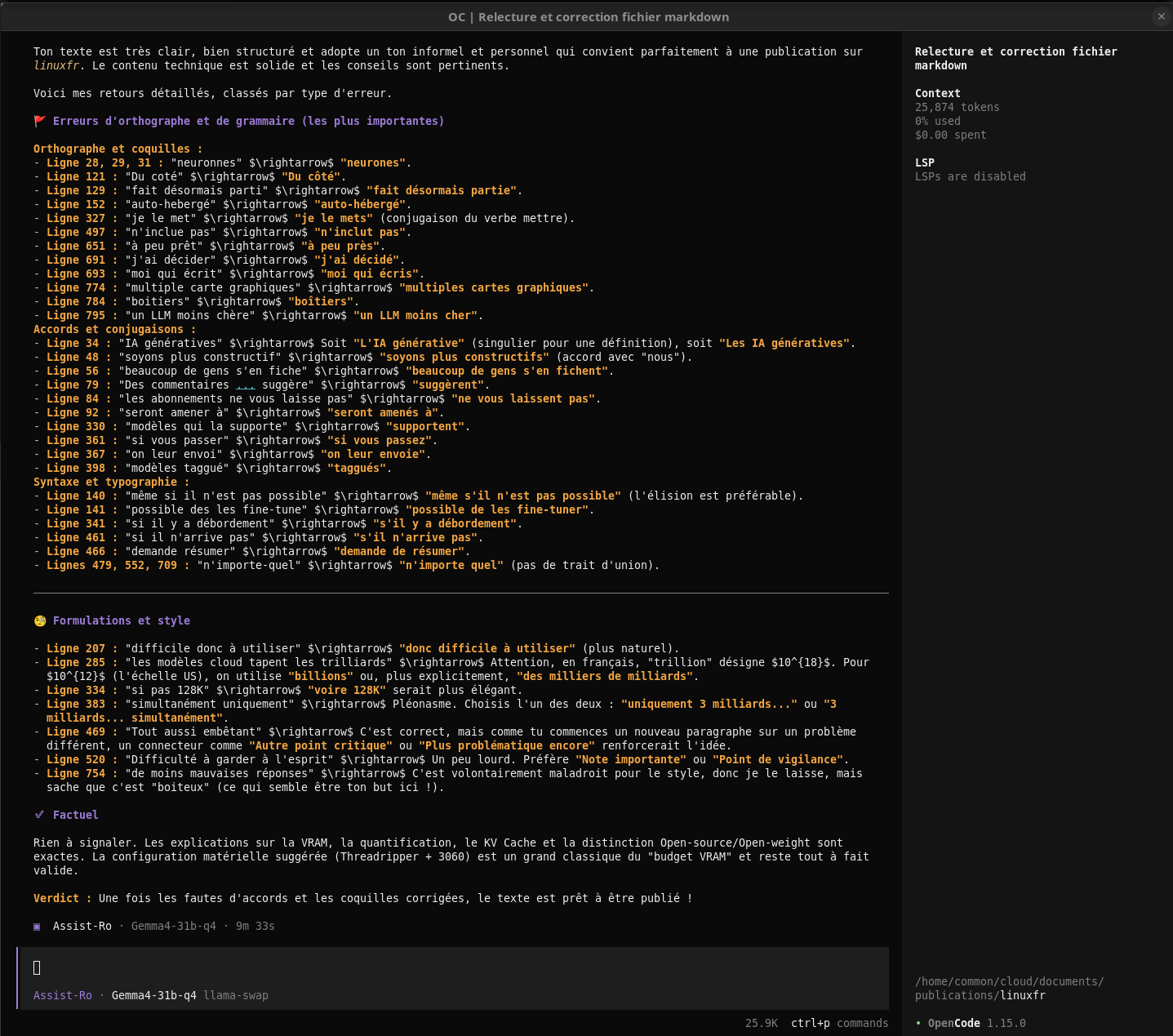
Except that in fact, I realized afterwards that some words were missing in some of my formulations. Neither I, nor a friend, nor Gemma4 had spotted them. It was Claude Opus 4.7 that saw them. Apparently, LLMs are subject, like us, to a completion bias :-)
Finding Hardware
The question many people ask: how to equip oneself without breaking the bank?
With the prices of RAM and GPUs having exploded, I have no good answer to this problem. Just less bad answers.
Apple M Computers
I don’t like closed environments, hardware or software. However we must give credit to Apple: their unified memory is perfect for LLM inference. Be careful though about the bandwidth of their memories. To have satisfying results, you need to go for M Ultra or M Max processors. It’s not cheap.
Note also that, on a Mac, you will generally be limited to doing inference. No training, no fine-tuning. Few fine-tuning software support Macs.
If you want to buy a complete configuration just for inference, second-hand Mac Studio M1s have an unbeatable VRAM/price ratio currently.
The AI Backyard Lunatic Approach
Personally, I opted for a configuration based on multiple graphics cards. And to my knowledge, currently, the cheapest Nvidia graphics cards per gigabyte are the RTX 3060 12 GB. If you want to do GPU stuffing in a single case, the cheapest option is an old AMD Threadripper processor and the motherboard that goes with it, to have enough PCIe lanes.
Here is a suggestion for a badass configuration, top-of-the-line-from-2018 style:
- Taichi X399 Motherboard with 4 PCIe 16x slots: 200€ on Ebay
- Threadripper 1950x Processor: 100€ on Leboncoin
- 2x 2x 16GB of DDR4 3200Mhz: 2x 150€ on Ebay
- 1200W Power Supply: 200€ new (because you probably don’t want a power supply already worn out)
- 1TB NVMe: 200€ new (same logic as the power supply; I rarely buy used disks)
- Graphics cards: 4x 250€ on ebay
- Cooler Master MasterFrame 600 Case: 200€ (warning: most other ATX cases can only accommodate 3 double-slot graphics cards)
That makes a total of 2200€ for 48 GB of VRAM, and the noise can be problematic 😑.
That said, this configuration mainly has the merit of being improvable gradually later (for example, when the AI bubble has finally burst).
Conclusion
If you hope to have an LLM cheaper than cloud options, it’s to say the least complicated. But there are other reasons to want to host your LLMs.
