French version available on LinuxFr.org.
Comments can be posted on LinkedIn.
Introduction
Comrades, digital proletarians, penguins! Unite! Against the rent-seeking of proprietary AI, let us arm our GPUs! Let’s seize the means of intelligence production!
Alright, soapbox aside. Let’s talk about LLM and hardware.
This article is essentially a deep dive into my previous article on self-hosting AI.
To get the most out of this, you should be familiar with:
- Linux in general
- Docker
- The PCIe bus
- Some basic concepts regarding self-hosted LLMs (otherwise, this is going to sting like hell).
In my previous article, I suggested a few hardware solutions. Since then, I’ve gathered more data, played around much more with my toys, and (as with almost everything in the current AI world) things have moved surprisingly fast. I’ll also dive deeper into the two hardware setups I’ve tested. Each has its own pitfalls that are well worth mentioning.
But first, let’s talk about what I’m not going to talk about.
Out of Scope
Image Generation and Others
I’m sticking exclusively to LLMs.
Generally, almost none of the optimizations mentioned here apply to image generation AI.
Plus, the inference engines for image generation that I’m familiar with (primarily ComfyUI and stable-diffusion.cpp) only support a single GPU and CPU offloading. They aren’t capable of utilizing multiple GPUs.
I will only briefly mention stable-diffusion.cpp in the llama-swap configuration for the Intel Arc Pro B60.
Inference Engines
I will only discuss llama.cpp, llama-server (which uses the llama.cpp library), and llama-swap (which can use llama-server).
I won’t be discussing the router mode of llama-server because llama-swap is, and will always be, more flexible.
I won’t be discussing Ollama. Technically, they seem to be falling further and further behind llama-server. Politically and commercially, they seem to be leaning more toward a cloud approach, which honestly makes me a bit sick.
I won’t be discussing vLLM, simply because vLLM is a nightmare to configure, and I value my mental health more than a few extra tokens/s.
I won’t be discussing other inference engines simply because I’m not familiar with them, and llama-server and llama-swap fully satisfy my needs.
Performance Benchmarks
Evaluating LLM performance is remarkably difficult:
- LLM speed depends on your hardware, context size, and the exact model variant (dense, MoE, MTP, QAT, q4_k_m, q4_k_xl, q8_0, and so on).
- Intelligence, precision, and hallucination rates depend on the exact model variant… and exactly what you’re asking it.
The so-called “industry standard” benchmarks found online are increasingly criticized. There are growing suspicions that some AI creators optimize their models specifically to score well on certain benchmarks.
Adding to this noise, we have people with ancient graphics cards, ridiculously small VRAM, and massive CPU+RAM offloading claiming to have great generation speeds (over 15 tokens/s). They immediately rush to LinkedIn to proclaim that they can replace Claude Opus for free. I’d bet they only tested it with an MoE model, tiny, almost empty contexts, or very simple prompts. I know they’ll be crying when they actually try to use it for agentic programming, but they probably won’t delete their post. (Seriously, I see this every few days on LinkedIn, it’s exhausting…).
Therefore, I’m discarding the idea of providing a set of benchmark results. The way I see it, the best way is for you to try a few models in real-world scenarios and judge for yourself.
Current Top Models
For now, my recommendations haven’t really changed since my last article.
The current champions:
- Qwen-3.6 27b: The coding pro.
- Gemma-4 31b: The pro for everything else (web search, assistant, role-play, etc.).
And then there are their smaller MoE (Mixture-of-Experts) siblings:
- Qwen-3.6 35b
- Gemma-4 26b
MoEs are faster, but potentially a bit more “dim-witted”.
Also worth noting is a very recent arrival: Ornith 35b. This is a derivative of Qwen-3.5 35b aimed at being slightly better at programming. Personally, I haven’t used it enough to give a definitive verdict.
As a reminder, there are plenty of fine-tuned variants of these models.
For example, TheDrummer publishes many oriented toward creativity rather than intelligence and accuracy. The ReadyForArt group publishes LLMs fine-tuned for role-playing and narrative continuity (and… well, you know the rest ^^).
A Quick Introduction to Neural Networks
To understand the optimizations, you need a rough idea of what a neural network is.
Buckle up. I’m going to oversimplify this massively, but for some of you, it might just jumpstart some neurons that’ve been in a coma since you finished school 🧠🔥. (Waking up neurons to talk about neurons, haha, I’m so funny 🫠).
An Artificial Neuron
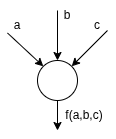
An artificial neuron takes several real values as input and spits out one as output.
Inside, a neuron is essentially two mathematical functions:
First, a basic function of the type f(x) = a.x + b, but with as many as and xs as the neuron has inputs. So, in my super diagram of a neuron with 3 inputs, it’s actually f(x, y, z) = a.x + b.y + c.z + C. During inference, a, b, c, and C are constants. These are the famous “weights” everyone talks about.
We then pass the output of this first function to a second function, the activation function. But since I’m oversimplifying everything for this article, we can completely ignore this second function (sorry to the mathematicians who just had an aneurysm reading this 🫣).
An Artificial Neural Network
I’ll oversimplify again. Thanks to those who already know neural networks in detail for not smothering me with a pillow in my sleep because of this!
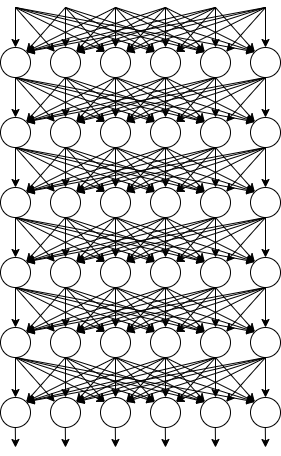
As you’ve probably guessed, a single neuron is useless. Otherwise, your middle-school Casio calculator would have developed consciousness by now.
Things start getting interesting once you have a few million neurons. And once you hit a few billion, with the right architecture, you get networks that are significantly more intelligent than the average fascist, or even more intelligent than a cockroach or a rat!
But millions of neurons are a bit hard to represent on a diagram. So we’ll stick to this diagram of a network with 36 neurons.
The network’s input consists of words, but words transformed into numbers (this is vectorization, and it’s completely out of scope for this article). The output consists of numbers, which will be transformed back into words (also out of scope).
Now, the bottom line: You’ll notice that the neurons are organized in lines. Each of these lines corresponds to a “layer” of neurons (simplification!).
Backends
There are currently four graphics card manufacturers whose GPUs are (more or less) supported by most open-source projects: Nvidia, Apple, AMD, and Intel.
In order from generally best supported to least, the most common backends are:
- cuda: Nvidia only
- vulkan: Universal, but generally slower
- rocm: AMD only
- sycl: Intel only
- metal: Apple only
Fun fact: Vulkan allows you to use GPUs from different manufacturers together (Nvidia, AMD, Intel, etc.)! But for now, it’s so slow that it’s not really useful… 🙃
Update 2028/08/30: Actually the Vulkan backend works great with AMD GPUs.
Optimizations
Now that we have the theoretical basics, let’s get to the point!
KV Cache Quantization
llama-server option: --cache-type-k and --cache-type-v
It’s not just the model that can be quantized to save VRAM. The KV cache can be too.
I don’t have precise statistics, but it seems it can be quantized to q8_0 without noticeable degradation. When I’m really tight on VRAM, I quantize the V cache to q4_0.
Multi-GPU
LLMs distribute themselves quite nicely across multiple graphics cards. This allows for more VRAM to fit larger models, but it also accelerates inference.
llama.cpp (and by extension llama-server) supports several distribution modes.
Nvidia: NVLink
This is a Nvidia-specific option for interconnecting their GPUs.
If you’re rich or run an AI datacenter, apparently it’s a viable option. But let’s be real: if you’re reading this, you’re most likely operating out of your basement on a regular salary. So I’m not even going to waste my breath on this option.
Layer Splitting
llama-server option: --split-mode layer
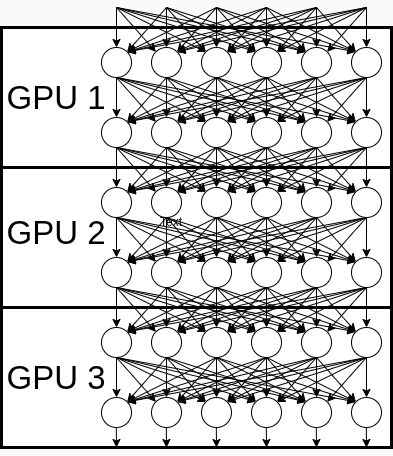
Each GPU handles a set of layers. For each token to be generated, the 1st GPU takes the input values, processes them through its layers, and sends the output to the next GPU. The next GPU does the same, and so on.
Not shown in the diagram: your machine’s PCIe bus and CPU, which are basically twiddling their thumbs.
Pros:
- Simple implementation.
- If your PCIe bus or CPU is limp as a wet noodle, it won’t slow down your LLM too much.
- During prompt reading, tokens are pipelined. So this is super fast.
Cons: During token generation, while one GPU is working, the others are waiting. Therefore, your output speed (tokens/s) is only as fast as a single one of your cards.
Tensor Splitting
llama-server option: Formerly --split-mode row, now --split-mode tensor.
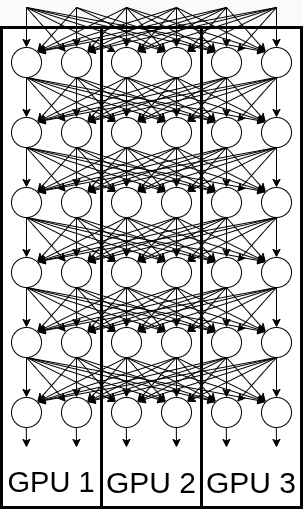
Each GPU handles a part of every layer. They constantly exchange values, like kids swapping Pokemon cards at recess, but much faster. All these communications happen via your PCIe bus.
Not shown in the diagram:
- Your machine’s PCIe bus, which is getting absolutely wrecked;
- Possibly your CPU, which got flattened like a pancake if it was in the way.
Pros: If your PCIe bus and CPU survive, this provides much better GPU utilization and therefore significantly more tokens/s.
With --split-mode row, the KV cache wasn’t distributed across GPUs. In other words, one GPU handled the entire KV cache, and the others constantly consulted it. Obviously, that wasn’t great.
So the wonderful elves behind llama.cpp gave us --split-mode tensor. Similar to row, but it distributes the KV cache intelligently. And this mode kicks ass!
And this is where you see how fast things are moving in self-hosted AI: tensor mode is still documented as experimental, but row mode is already marked as deprecated 😁. Until very recently, tensor mode didn’t support quantized KV caches. They are still documented as unsupported. But I can tell you from experience that they are now supported 😎! One limitation: the k cache and v cache must be quantized the same way (no mixing q8_0 and q4_0, for example).
The documentation doesn’t clearly state whether you need to enable IOMMU in your BIOS or not.
Note that --split-mode tensor can exploit P2P (peer-to-peer) communication on your PCIe bus if available.
P2P on the PCIe Bus
Unfortunately for me, my hardware doesn’t support it, so I couldn’t test it. Plus, the documentation on this subject is extremely sparse currently. That said, my GPUs are already running at 100% without it, so I don’t think it would bring me much.
Anyway, for those with way too much cash and who should probably just donate some Nvidia GPUs to me, here’s some random info I noted while trying to get it to work:
You need to run llama-server with the environment variable GGML_CUDA_P2P=1.
Maybe you need to enable IOMMU in the BIOS, maybe not.
Regarding kernel options (/etc/default/grub on Debian), maybe boot with amd_iommu=on iommu=pt (IOMMU in “passthrough” mode -> less security, more performance), or maybe not.
Maybe you need to apply a patch, maybe not.
You can check your GPU interconnection with nvidia-smi topo -m.
ReBAR
Make sure to enable the Resizable BAR option in your BIOS. This allows your RAM and VRAM to exchange larger blocks of data (256 MB without ReBAR, potentially up to the size of your VRAM with ReBAR).
This is particularly important for Intel cards (and possibly AMD). If you don’t enable it, the Intel driver will actively lecture you in dmesg, and performance will be clearly degraded.
ASPM
Active State Power Management. This is mainly for Intel cards (and possibly AMD). When your GPU is idle but your VRAM is loaded, this option drops your GPU from consuming 30W and heating up to consuming a few watts and staying cool.
Enable the option in your BIOS. I also suggest adding pcie_aspm.policy=powersave to your kernel options (/etc/default/grub + sudo update-grub on Debian).
Flash Attention
At this point, it’s a no-brainer: regardless of your configuration or model, you must enable flash attention. In fact, it’s even a prerequisite for --split-mode tensor.
XL Quantization Variants
In my previous article, I talked about quantization. Being a total slacker, I didn’t bother detailing the variants. I just mentioned that for tool use (agentic programming, home automation, etc.), q4 quantized models (generally q4_0 and q4_k_m) are often too imprecise.
But since then, there’s been an evolution: The Unsloth project is offering more and more models quantized in q4_k_xl. And that changes things.
So, I actually need to explain this variant story.
For the rest of this section, I’ll use q4 quantization as an example, but the same principles apply to q5, q6, q7, q8, etc.
Once upon a time, there was only q4_0. q4_0 is a very simple quantization: after training a model, weights are generally 32-bit floats, meaning ~4 billion possible values. In q4, we want to fit them into 4 bits, which means 16 possible values (and the crazy part is that it works!).
To do this, we go through each line of weights and identify the min and max weights. We then calculate the reduction factor by which we must multiply each weight in the line to bring them between [-8, 8[. Then we multiply all the weights in the line by this factor to reduce them and truncate them to their integer value. Beside each line, we note the reduction factor used.
Mathematicians will quickly realize that this assumes weights are centered around 0. q4_1 optimizes this by also calculating and storing an offset for each line.
In 2023, the llama.cpp project proposed a more subtle quantization: k-quants.
Roughly speaking, instead of applying a reduction factor for each line, we group the weights (for example, by 32) and apply a factor and an offset for each group.
Additionally, it was observed that some weights are more sensitive to quantization than others. Consequently, with k-quants, it’s possible to have a higher quantization than the base quantization for certain more sensitive layers (for example, q6 for some layers in a q4_k_m). The suffixes _s, _m, or _l each correspond to a set of “over-quantized” weights. Unsurprisingly, _s is the smallest weight set. At the time, _l was the largest.
At the beginning of 2026, a new suffix appeared: _xl.
Of course, it’s not perfect. There’s always a loss of precision, and I think q8 remains widely preferable whenever possible. In my experience, q4_k_xl is noticeably more reliable than q4_k_m for tool calls (and probably for other things). This makes it a very interesting compromise when VRAM is limited (which it almost always is).
QAT Models
QAT stands for Quantization-Aware Training. QAT models are models where the quantization issue was taken into account during their training. For example, precision problems due to quantization might have been simulated during training. These models are therefore much more tolerant of quantization.
For your information, Gemma-4 models are available in QAT variants.
MTP (Multi-Token Prediction)
llama-server option: --spec-type draft-mtp
Instead of predicting one token at a time, MTP models predict several tokens at once. The performance gain can range from nothing at all up to the number of tokens simultaneously generated, depending on your hardware.
There are Qwen-3.6 variants that directly integrate the MTP model. For Gemma-4, however, the MTP model is distributed in a separate file from the model itself (llama-server option: --spec-draft-model <X>).
Batch Sizes
llama-server options:
-b <X> / --batch-size <X>-ub <X> / --ubatch-size <X>
During “pre-filling” (reading the prompt), tokens are sent in groups (batches) to the GPUs. Make your batches too small, and your graphics card will waste a lot of time making round trips between RAM and GPU via your CPU and VRAM. Make them too large, and your VRAM will go boom.
Depending on your hardware, the default settings might already be near-optimal, or it might be worth playing with these values.
Note that llama-server distinguishes between logical batches (--batch-size) and physical batches (--ubatch-size). A physical batch can only correspond to a single conversation. A logical batch can group several physical batches. The concept of a logical batch changes nothing if you don’t have several conversations in parallel. Therefore, to optimize your installation, you can focus primarily on adjusting physical batches --ubatch-size.
Intel: The Persistent Sycl Cache
It crashes. ¯\_(ツ)_/¯
When it finally works, I assume it’ll be a very useful optimization for speeding up model loading (which seriously needs to be faster). But all my attempts with llama-server resulted in the same thing: a crash.
For the day it actually works, there are 2 environment variables to define:
SYCL_CACHE_PERSISTENT=1SYCL_CACHE_DIR=/a/persistent/path
The mmproj
The .mmproj file allows models that have one to “see”. You can provide an image to these models, and they can examine it.
If you’re doing agentic programming, vision is generally not useful. You can simply not provide the mmproj to llama-server and save some VRAM.
Comparing Before and After
Avoiding CPU+RAM Offloading
In my previous article, I said you could see offloading in the logs of llama-server. With no surprise whatsoever, shortly after the publication of my article, they changed the logs 🙄.
Since offloading is the enemy anyway, the easiest way is to just block it: --n-gpu-layers 9999 and --fit off. If you exceed your VRAM, llama-server will hit an error, resulting in a disgusting but dreadfully effective crash.
nvtop
nvtop is a great tool for quickly visualizing:
- VRAM usage;
- GPU utilization;
- GPU temperature;
- Graphics card power consumption.
Despite its name (historical), it is compatible with Nvidia, Intel, and AMD cards.
llama-swap
The llama-swap web interface includes a playground. You can perform a quick test there. Then you can see in the llama-server logs the speed of your LLM (I have a feeling I’ll regret this last sentence by my next article… 😅).
A classic quick test: “write me a poem”.
This is obviously not a complete benchmark, but it immediately gives you a rough idea.
llama-bench
If you want to evaluate performance aggressively or quickly try different settings, the llama.cpp developers have thought of you!
You need to stop your llama-swap instance to be able to run llama-bench.
Example usage, to find the best --ubatch-size on an Intel card:
docker run --rm \
  --device /dev/dri --group-add 44 --group-add 993 \
  -v "/data/llama.cpp/models:/models:ro" \
  --entrypoint /app/llama-bench \
  ghcr.io/ggml-org/llama.cpp:full-intel \
  -m /models/ornith/ornith-35b-UD-Q4_K_XL.gguf \
  -t 1 -r 3 \
  --n-prompt 32000 --n-gen 1024 \
  --cache-type-k q8_0 --cache-type-v q4_0 \
  --n-gpu-layers 999 \
  --flash-attn on \
  --ubatch-size 256,512,1024,1500,2048
The Hardware
As explained in my previous article, the heart of the matter is money… or rather VRAM… well, given current prices, it’s clearly both.
The Apple Solution
Having a holy hatred for proprietary systems, I didn’t acquire a Mac for AI. But to be rigorous, I still evaluated this approach. And I forgot to mention something important in my previous article: Mac minis are poorly suited for intensive AI use. Mac minis have two major drawbacks for AI:
Current Mac minis are sold with at best M4 Pro chips. Their memory bandwidth is only 273 GB/s. Even my old Nvidia RTX 3060s do significantly better (360 GB/s). In other words, that’s a recipe for anemic LLMs.
An LDLC salesperson also explained to me that Mac minis aren’t sufficiently ventilated for AI. When used intensively, they overheat. He mentioned having had many Mac Mini returns because of this.
I suspect MacBook Airs have exactly the same problems.
So, if you want to seriously run AI on Macs, you’ll absolutely need a Mac Studio (or maybe a MacBook Pro?), preferably with an M Max processor.
The Budget Solution: Intel Arc Pro B60
The Good
In terms of new graphics cards, the best VRAM/price ratio is currently held by the Intel Arc Pro B60. It has 24 GB of VRAM and only costs €750 (well, “only”, yeah, okay, whatever).
So, I cracked and bought two. Hey, we all make mistakes ¯\_(ツ)_/¯.
The B60 has solid advantages:
- It’s well-suited for image generation AI with ComfyUI and stable-diffusion.cpp. It’s more than enough for foot fetishists to get their fill ^^.
- It has enough VRAM for agentic programming at an “acceptable” level.
- It runs video games at least as well as an Nvidia RTX 3060.
- Regarding the Linux driver, on Debian, you grab the trixie-backports version of the kernel, and you’re good to go. Wayland works perfectly, no weird bugs from outer space, no Steam games that only start 2 out of 3 times. Just a GPU that works.
- Regarding Docker, same thing: no
nvidia-docker-container-runtime-toolkit-thingyto install. Just two/devto redirect, and finito.
For agentic programming, you can fit the Ornith 35b q4_k_xl model with a 256K token context. Ornith is a variant of Qwen3.6 35b. Without being Claude 3.5 Sonnet, they hold their own quite well. It will output about 30 to 40 tokens/s, which is comfortable. You could also decide to have only 128K contexts but allow two of them (--parallel 2), thus opening the possibility of using sub-agents.
If you want more human-like prose, a Gemma-4 26b q4_k_xl will give decent results. It won’t match a Gemma-4 31b, but with this card, the 26b allows for a significantly longer context (192K instead of just 32K) and better throughput. Typically, on this card, you can expect 20 to 30 tokens/s.
Careful though: these figures are for a headless server. If you have a GUI running, you’ll have less VRAM available. You’ll need to reduce the contexts.
The Bad
But. (You didn’t think it would be that easy, did you?)
It’s got some flaws you just can’t ignore:
- The Sycl backend is usually the most neglected by projects. Sometimes it crashes, and the only solution is to use a Vulkan backend instead (about 50% slower).
- Due to the lack of a persistent Sycl cache, model loading time is horribly long (in the range of 1 to 2 minutes).
- Multi-GPU support (Sycl or Vulkan) FHPXF CBARL QVPXF VA URYY 🤬! Either it crashes all the time, or it’s incredibly slow. And yes, I spent far too many hours trying to get it to work. In short, the jury’s still out.
Use Case
This is definitely a good graphics card if you don’t want to drop too much cash to self-host your AIs. But for now, you must be absolutely sure you don’t want to use more than one Intel card.
Typically, this can be a low-cost solution to complement a cloud subscription: Qwen3.6 q4_k_xl on the Intel for operations that don’t require too much intelligence, and Claude or whatever for the operations you should probably be doing yourself 🙄.
In my case, the first one ended up in my personal server. I use it with Gemma4-26b q4_k_xl for tasks that don’t require much intelligence (Home Assistant, quick questions, etc.). The second became my gaming card… way too expensive for the rather mediocre performance it has ¯\_(ツ)_/¯ (but I also tinker a bit with ComfyUI and others).
The Big Sister
There is also the Intel Arc Pro B70. It has 32GB of VRAM and more power. However, in Europe, it’s currently around €1200.
Specific Optimizations
Obviously, you’ll get the best performance using the Sycl backend.
Beyond the engine and VRAM optimizations, there is one useful optimization: --ubatch-size 1024. According to my tests, this significantly increases the speed of prompt reading (pre-filling).
llama-swap Configuration Example
Below is an example of a llama-swap configuration.
With this configuration, llama-swap must be installed directly on the host system, but it then starts the AIs in Docker. The advantage of this approach is that you can easily fall back to a Vulkan backend if needed, and more easily juggle Docker images until you find one that doesn’t crash 🛠️😵💫.
(Note on permissions in /dev/dri: the --group-add needs to be adjusted)
|
|
And the accompanying Systemd service:
[Unit]
Description=Llama-Swap Service
After=network.target docker.service

[Service]
Type=simple
ExecStart=/path/to/llama-swap --listen :8123 --config /path/to/config.yaml
Restart=always
RestartSec=5
WorkingDirectory=/path/to/whatever/you/want/we/dont/care/actually

[Install]
WantedBy=default.target
Throw an Open-WebUI and/or Home Assistant and/or opencode in front of that, and you’ll have a pretty nice self-hosted AI solution.
The DIY Approach: The “Junkyard” Build
Now that we’ve talked about those shiny but limited toys, let’s talk about the nuclear option, 2018-style.
The Hardware
Configuration
- Power Supply: minimum 1200W (1500W in my case)
- Motherboard: Taichi X399
- CPU: AMD Threadripper 1950x
- Graphics Cards: 4x Nvidia RTX 3060 12GB
- RAM: minimum equal to VRAM, so 48GB (96GB in my case)
The Threadripper processor line is very interesting for this kind of build. These are processors with a lot of PCIe lanes. As we’ve seen, for split-mode tensor, PCIe lanes are crucial.
The Taichi X399 only has PCIe gen 3. But I’ve found that this is clearly not a problem. My 4 GPUs run at 100%, so the PCIe gen 3 bus isn’t a bottleneck.
In my case, since my power supply allows it, the plan for later is to add PCIe splitters and put in 2 more RTX 3060 12GB.
I’m not providing the prices for this build because since my last article, they’ve already shifted. And at the pace things are going, they’ll have shifted again before you finish reading this article…
The Frames
In my previous article, I screwed up: a Cooler Master MasterFrame 600 case cannot properly accommodate four Nvidia RTX 3060s. Why? Because they’re going to heat up. It’s frustrating when your LLM slows down because the machine is on fire… 🖥🔥🚒. More seriously, from experience, one of the cards quickly hits 90°C and thermal throttles. It’s not dangerous, but unless you want to open a pizzeria and need a very bad oven, it’s just not practical.
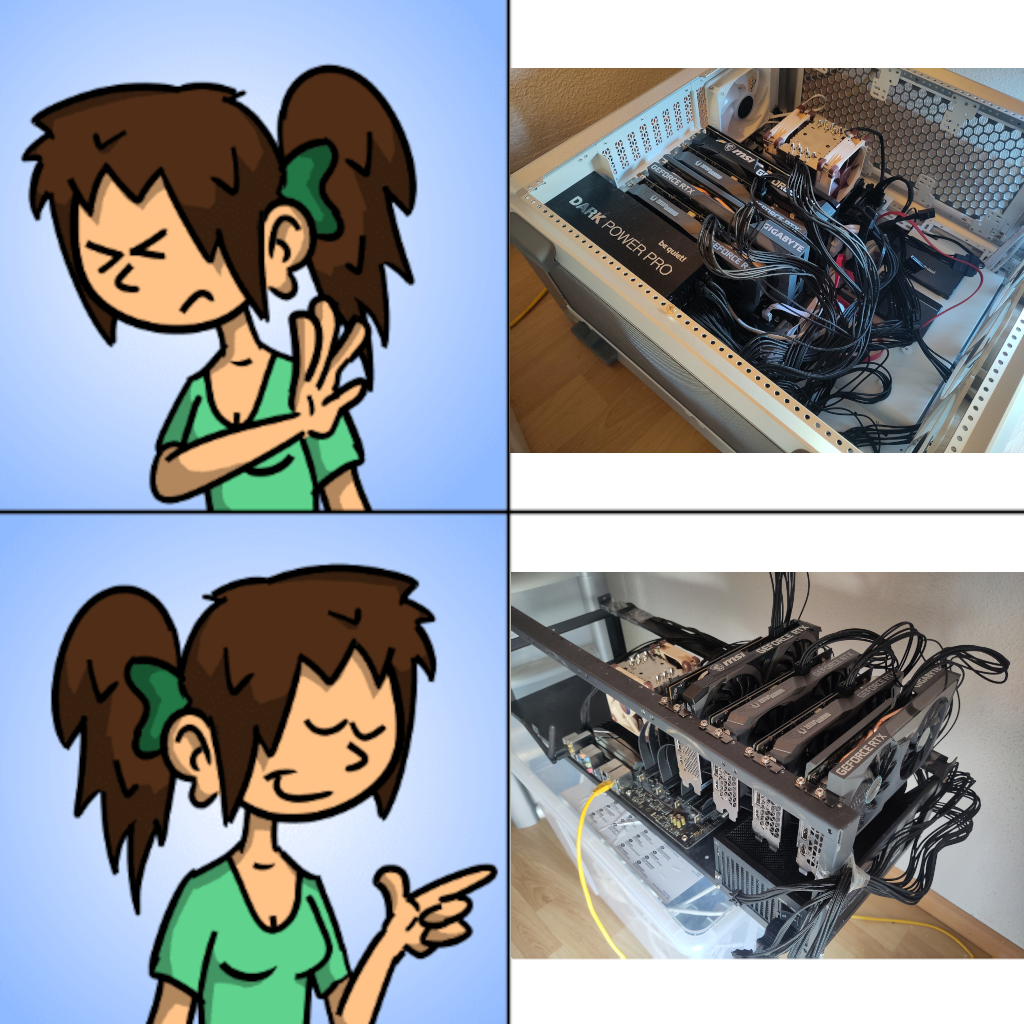
The simplest solution is ultimately an open frame and PCIe risers. Yes! The same frame used by cryptocurrency miners. Now that they’ve moved to ASICs, might as well recycle their waste for AI \o/
Heads up: these frames are built for ridiculously anemic CPUs with tiny fans. But we’re the real heavy-hitters, the absolute units who don’t settle for anemic gear 💪! So when we do AI, we must have Xeon or Threadripper with huge fans. And on an open 6-GPU frames, it often doesn’t fit (I’ve tested it…). So even if you only plan to put in 4 cards, I recommend getting a 12-GPU frames right away. It’s ugly, but it works ¯\_(ツ)_/¯.
Let me show you the problem with the help of my buddy Ducky the duck 🦆:
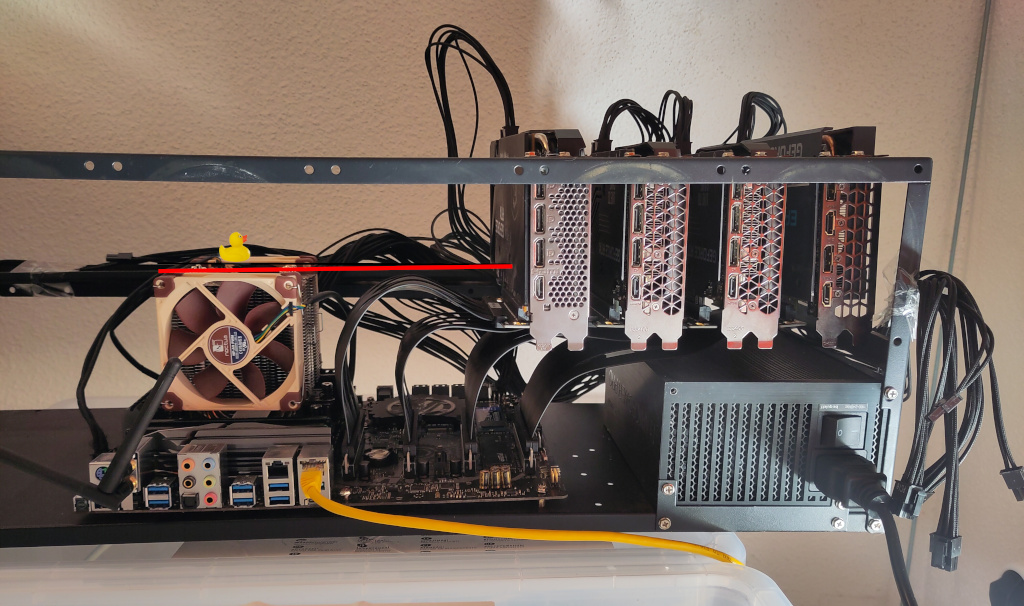
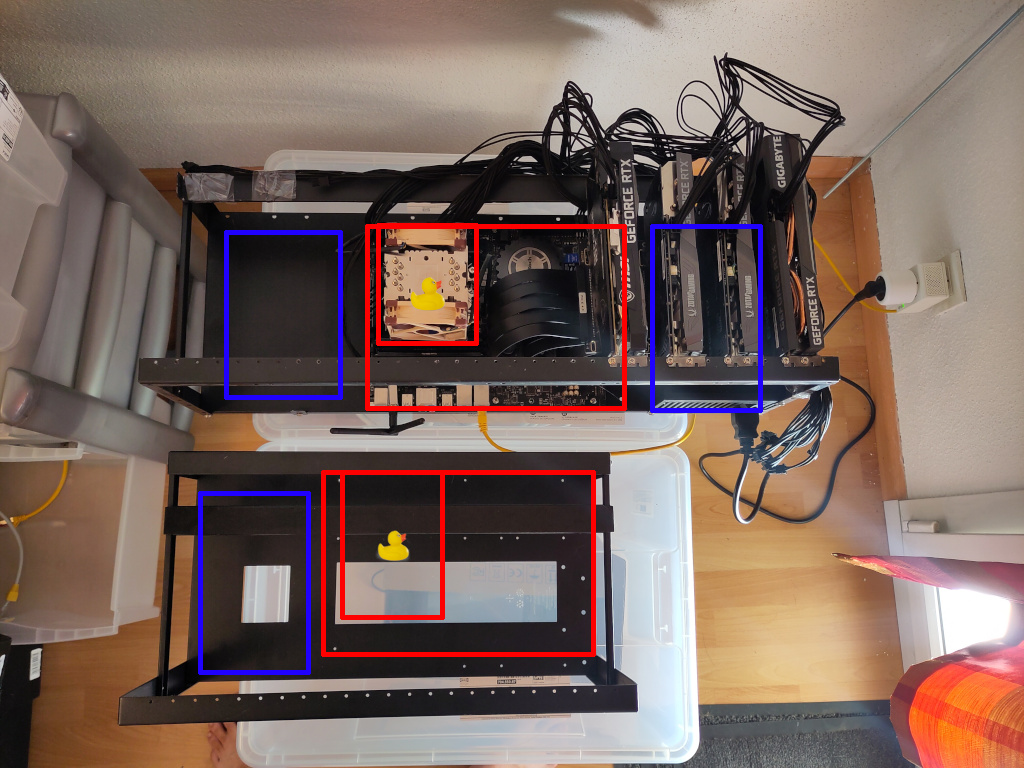
Of course, they could have just provided the holes to allow rotating the motherboard. But since we weren’t the target audience back then, they didn’t give a damn.
PCIe Risers
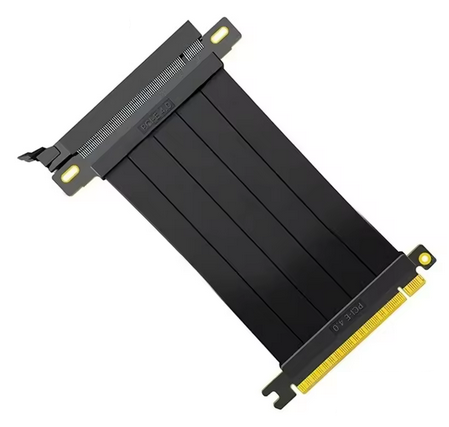
Here, however, whatever you do, do NOT recycle miners’ risers. Those are PCIe gen1 1x risers, made of cardboard and glue, with dubious USB 3 cables and power cables that smell like a fire hazard. For AI, you imperatively need PCIe gen3/gen4 16x risers, properly shielded, and not too long (20cm max!).
PCIe Splitters
Note: I haven’t tried the splitters yet! I ordered mine, but I haven’t received them. I’m dropping some key info here that I haven’t found anywhere else.
If you decide to use splitters, you must also be careful. A graphics card plugged into a PCIe 16x port can legitimately draw 75W from that port. Your splitter must be able to provide these 75W without starting a barbecue. Splitters therefore need additional power. Some take this via a SATA power connector, and are therefore automatically suspicious: a SATA power connector can only provide 54 Watts more. Ironically, the good old Molex connectors are better suited for this, with a maximum of 132 Watts.
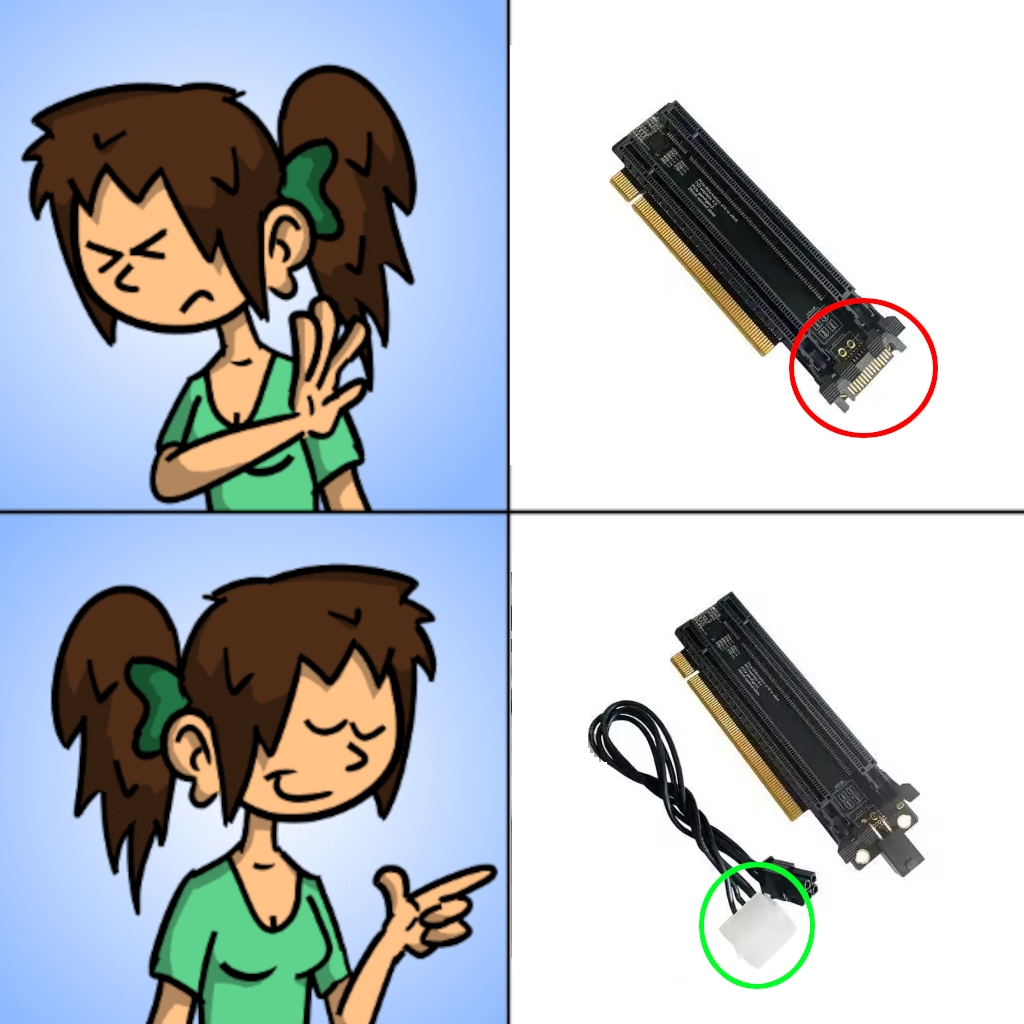
The Good
With 48GB of VRAM, things start getting fun. The VRAM accommodates a qwen3.6 27b q8 without any problem. And with split-mode tensor, it performs brilliantly 🎉.
As a purely indicative measure (roughly estimated):
- Ornith 35b q8 (MoE):
- 512K context, split in two (to have agent and sub-agent);
- reading at ~1700 tokens/s;
- generation at ~100 tokens/s.
- Qwen-3.6 27b q8 (dense model):
- 192K context;
- reading at ~700 tokens/s;
- generation at ~40 tokens/s (dense model).
- Gemma-4 31b q4_k_xl (dense model; q8 gives me trouble):
- 128K context;
- reading at ~630 tokens/s;
- generation at ~45 tokens/s.
This is a build based on Nvidia cards. So, aside from the abomination that is the Nvidia driver, the software support is rock solid.
The Bad
Image generation AIs cannot be distributed across multiple graphics cards. Since each Nvidia card only has 12GB of VRAM, this build is a bit limiting for image generation. I prefer using one of my Intel cards for that.
The machine runs hot (“who could have predicted that?” 🙃).
The obvious risk with an open frames is dust. This is even more obvious if you have pets. For my part, I’m lucky to have a spare room/guest room where I can lock this machine. But that’s probably not the case for everyone.
The Taichi X399 is the top-of-the-line from 2018… so everything runs on PCIe gen 3, two of its physical PCIe 16x slots are actually wired only as PCIe 8x, and you can’t count on a P2P connection. With Nvidia RTX 3060s, this isn’t a problem: the GPUs are still the bottleneck. The day I change cards, that might change. That said, given current card prices, since I value my kidneys, that’s not happening anytime soon.
Optimization
On this build, the key point is definitely --split-mode tensor. Until this mode worked, I wondered if I’d been crazy to dump so much cash into this project. Now that it works, I still wonder, but at least I have LLMs that perform brilliantly 😎!
llama-swap Configuration Example
As mentioned in my previous article, you must first install:
Since I’ve had no notable issues with CUDA support, on this machine, I have llama-swap directly in a Docker container. The image includes llama-server.
The docker-compose.yaml:
|
|
The llama-swap config.yaml:
|
|
Conclusion
Self-hosting AI is not exactly a walk in the park. You have to hunt for VRAM, fight with capricious and proprietary drivers, struggle with poorly supported backends, resist the capitalist sirens of GPU vendors, and so on. In other words, the road to the Revolution is fraught with obstacles. But that is the price of our freedom, comrade penguin!