French version is available on LinuxFr.
Comments can be posted on LinkedIn.
Introduction
This article is a follow-up to my previous entries:
- Self-hosting your AIs: General Principles
- Self-hosting your AIs: Hardware and Inference Optimization
In this entry, we’re going to talk about running LLMs with little to no VRAM. In other words, we’re going to try and shove a large round peg into a small square hole.
Like me, you might have noticed something strange: there are plenty of YouTube videos, LinkedIn posts, etc., telling you that running LLMs on a museum piece (like an Nvidia GTX 1060 6GB with DDR4) is super simple. They explain that it’ll run lightning-fast, work perfectly, and so on. Apparently, you just need to find the right “magic parameters,” and poof! You’ll never need Claude Fable 5 again! 🎉
But if that’s the case, why aren’t all developers doing it? Also, this one guy explained it all so well: every LLM fanatic is desperately chasing the biggest graphics cards they can buy without having to sell their children.
Naturally, this is suspicious, and your common sense should be tingling.
Vocabulary
A few swear words that will be used frequently in this article:
- LLM: An AI that generates text;
- Token: A piece of a word (typically a syllable, for example);
- Context: Your conversation with your favorite LLM;
- Prefill: The (re)reading of the context by the LLM;
- Token prediction: The generation of words by the LLM.
The Problem with Inference Speeds
Measuring token prediction speed with a nearly empty context is trivial. Any YouTuber, LinkedIn influencer, or other person with a single brain cell knows how to do it and … often does nothing else. So, as someone with two brain cells, I’ll do it too 😁. We’ll generally consider a model usable if it reaches 10 tokens/s (which is actually quite optimistic, but let’s be generous).
Let’s take it a step further: for this article, my goal is also to see if there’s a performance degradation based on the context size. More importantly, I’m not just interested in token prediction, but also in the prefill speed with an existing context. For some uses, we just don’t care about prefilling (simple conversation, etc.), but for others, prefill speed is critical. A few examples:
- Home Automation: With Home Assistant, if you expose many devices to the LLM, that adds a lot of tool tokens to read at the start of every conversation. In my case, 13 exposed entities imply an initial context of 2,500 tokens. Now, a voice assistant must be very responsive (past 5 mississippis, I consider the average person to be getting impatient).
- Agentic Programming: The start of a session immediately involves ~8k tool tokens in my case.
- Still regarding Agentic Programming: Every time the agent calls a tool, it potentially receives a large command output or a substantial chunk of a file. Each time, it easily has to reread 1,000 to 10,000 tokens (if not more).
- Open-WebUI Discussions with tools enabled: The start of a conversation, in my case, is ~20k tokens right out of the gate (yep, I’ve loaded it like a mule ^^).
- Document Summarization: To summarize a 100-page PDF (the kind from a consulting firm that your company hired to advise you to do what you had already planned to do), the LLM has to slog through about 45k tokens.
And it gets worse: if you interrupted your conversation or agentic programming session the day before while the context was nearly full, your LLM will have to process the entire existing context again when you resume. For the following tests, we’ll use 64k tokens, but keep in mind it can be significantly more.
Are you starting to guess the trap many people fall into? 🧐
Mixture-of-Experts Models
The first thing you’ll notice is that those famous YouTube videos and other sources always invite you to use Mixture-of-Experts (MoE) LLMs, rather than dense LLMs.
In my first article, I mentioned that an MoE is essentially a set of specialized sub-LLMs (“experts”), and a primary neural network decides which other LLM to send the request to. In reality, this description is hyper-simplified. Specifically, there is an alternation between expert layers and attention layers. But for the purpose of this article, we’ll stick to this simplified view of MoE models.
One key thing to know: for every MoE LLM, the developer indicates the maximum number of simultaneously active parameters (e.g., A3B for Qwen-3.6 35B, A10B for Qwen-3.5 122B, A4B for Gemma-4 26B, etc.). But be careful: we are talking about the number of active parameters to process a single token! From one token to the next, different sets of experts/parameters will be called upon. Thus, for processing/generating each individual token, we clearly gain computation speed. However, to process a prompt or generate a full output, the entire model must still be loaded into VRAM/RAM.
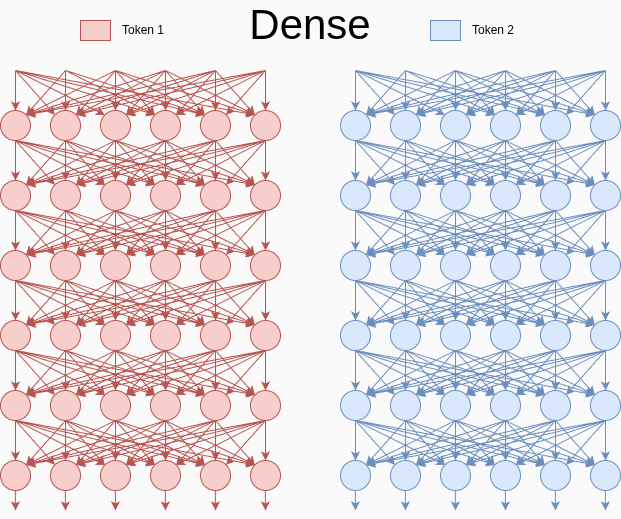
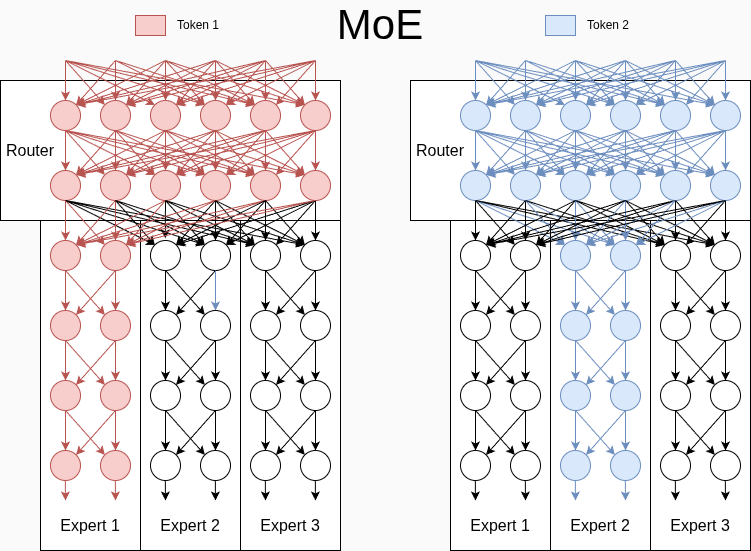
In the oversimplified example above, we’d be talking about an MoE model with 180 parameters, 116 of which are active simultaneously (reminder: arrows/synapses are parameters, neurons are functions and a constant parameter).
Clearly, at the same size, MoEs are much faster than dense models, which utilize most of their parameters for every token. They also place significantly less demand on VRAM/RAM bandwidth. They are actually so fast that the idea of overflowing VRAM and using the CPU and RAM to run larger models isn’t necessarily absurd.
Their main drawback is that, given the same number of parameters, they are dumber than dense models. For example, Qwen 3.6 35B A3B is notably dumber than Qwen 3.6 27B.
However, it’s worth noting that very large LLMs (>1T) are often MoEs. This architecture makes their inference significantly less costly. Yet, they are far from dumb. They compensate for their proportional lack of intelligence by being enormous and having a large number of simultaneously active parameters (e.g., A40B for GLM-5.2). In other words, a small dense model beats a slightly larger MoE, but a much larger MoE 💪 grabs the small dense model 🖐️ and wipe the floor with it 🧹.
Furthermore, a very large model tolerates quantization better than a small one. Theoretically, you can use a massive model in q2 and still get something correct.
And that’s where a comment from Andréas Livet on my previous article got me thinking. What if, for self-hosting, I had underestimated the utility of MoEs? What if those YouTube videos were right? What if we could reliably run a large MoE like Qwen-3.5 122B on consumer hardware? Maybe even larger? And where is the limit? Could GLM-5.2 work on my machine? In short, since this idea made me strangely drool 🤤, I had to test it.
Comparison Point: Cloud AIs
We’ll use well-known cloud LLM speeds as a reference. Except … damn, none of them publish official figures (haha, chickens! 🐤).
That said, the estimated prediction speed of Claude Opus 4.5 is around 40 to 50 tokens/s. I found only one estimate for prefill: ~400 tokens/s, but that seems rather low to me.
Warning: Benchmarks Ahead!
Let’s be clear: I hate benchmarks. Yet, in this article, I’m going to produce benchmark results that I did myself, like a big boy. These results are only there to give you a general idea and illustrate points; they are absolutely not intended to be exact. Moreover, as you will see, they are strongly dependant on both hardware and software configurations.
Furthermore, the conclusions drawn from these benchmarks are entirely subjective. I’ve tried to be as factual as possible, but the conclusions depend entirely on your needs and values. What I find unacceptable might not be for you, and vice versa.
With that, let’s proceed swiftly to bash our CPU+RAM against some LLMs, like the Titanic hitting its legendary iceberg.
Methodology
Hardware
All my tests were performed on machines with DDR4 3200 MHz.
I was never able to upgrade to DDR5 because of the Ramapocalypse… (for those living under a rock and who haven’t seen the light since Covid: DDR5 prices are completely lunar, and it’s probably going to get worse). If you want to do a rough comparison with the best DDR5 available today, you can multiply the values limited by CPU+RAM by factors of 1.5 to 2.5. With a bit of luck, it might be roughly correct.
Models
I used the Qwen 3.5 family. For this family, Alibaba developed a wide variety of LLM sizes, producing both dense and MoE models. This seemed ideal for illustrating the points in this article.
- Qwen 3.5 ≤ 27B are dense.
- Qwen 3.5 ≥ 35B are MoE.
All these models have a maximum context of 256K tokens.
Additionally, Qwen 3.5 27B has the exact same architecture as my favorite Qwen 3.6 27B ^^.
MTP
I did not have MTP enabled for these benchmarks.
Based on my personal experience, entirely subjective and measured with my backside, MTP only helps when the model is entirely on the GPU. It does not help (and may even degrade) performance as soon as the CPU is involved. Therefore, for consistency, I disabled it in all my benchmarks.
Measurements
I primarily prepared speed curves based on context size. I used llama-bench. Initially, I used a for loop, but before I had time to understand what was happening, that loop became a messy Python script.
For each context/prompt size, I ask llama-bench to have the LLM read said context size, then generate 512 tokens. Note that llama-bench generates tokens randomly. It doesn’t try to make meaningful sentences. Therefore, I suspect this activates the MoEs like Christmas trees.
The execution time of llama-bench for each point was limited to 2 hours. This limit explains the absence of certain points on some curves.
Some models are occasionally missing entirely from certain graphs. This is because their tests failed for one reason or another, and I decided I had better things to do than fight with them. Incidentally, I strongly suspect there is a VRAM leak in the Nvidia driver: I had to restart my machine several times and run certain scenarios independently of others, while using the same settings each time.
For readability, the values in the tables are rounded (usually toward the worst case). I have bolded the estimated times that, in my opinion, are unusable.
5 Nvidia RTX 3060 12GB Graphics Cards
First of all, let’s quickly look at performance when everything runs on graphics cards, optimized to perfection (or not yet).
Prediction
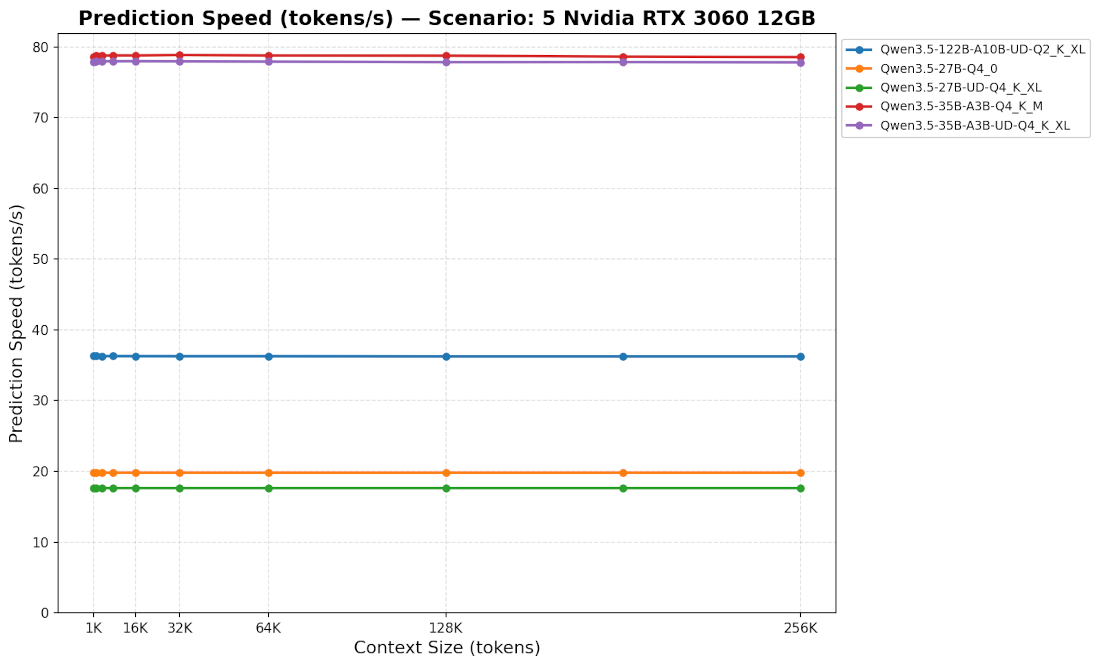
Prediction speed (token generation) is stable (spoiler: it’s always stable across almost all configurations). Unsurprisingly, MoE prediction speeds are particularly good, while dense prediction speeds are significantly lower. In both cases, it’s perfectly usable.
For reference, when MTP is enabled, Qwen 3.6 27B gives me about 40 tokens/s. In other words, very comfortable.
Prefill
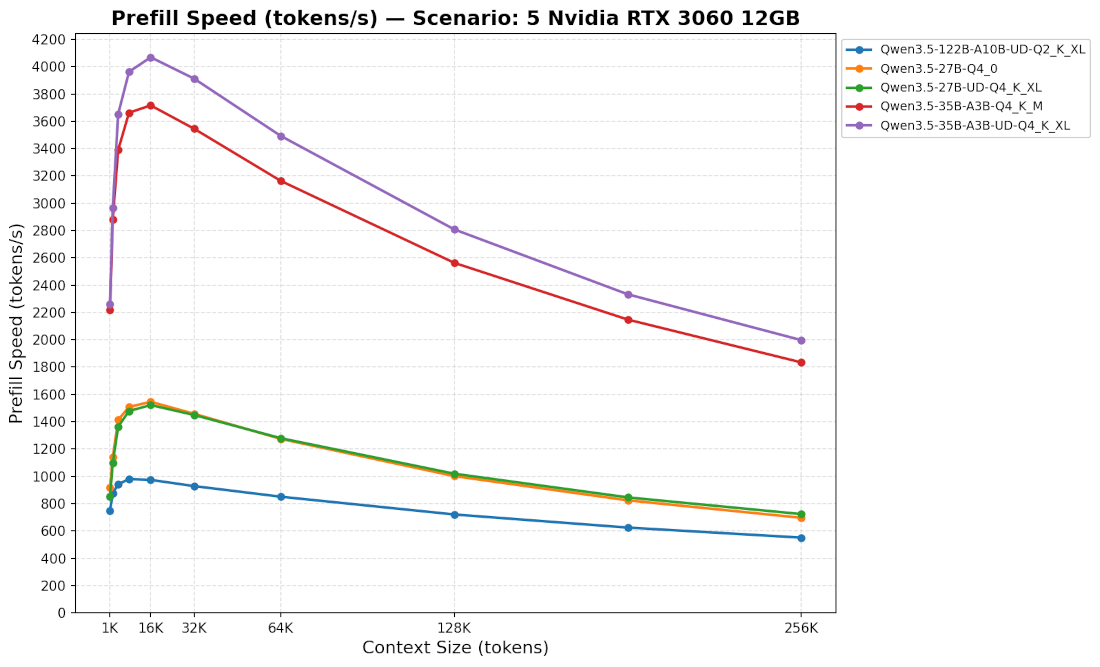
Clearly, it’s fast.
At first, we see an increase in speed as context size increases. But this is most likely just an artifact: I assume these contexts are too small to correctly measure speed on such a fast system 💪.
Then, a little surprise: we see that prefill speed decreases significantly as context size increases. But even with this significant decrease, we remain at very respectable speeds.
In practical use, with Qwen 3.5 27B (dense) and 35B (MoE), it looks like this:
| Tokens | Avg Speed | Estimated Time | ||
|---|---|---|---|---|
| Home Assistant | 2500 | |||
| MoE | 2750 | 1s | ||
| Dense | 1000 | 2.5s | ||
| Opencode | 8000 | |||
| MoE | 3650 | 2.5s | ||
| Dense | 1450 | 5.5s | ||
| Tool-enabled Open-WebUI | 20000 | |||
| MoE | 3650 | 5.5s | ||
| Dense | 1500 | 13s | ||
| 100-page PDF | 45000 | |||
| MoE | 3350 | 13.5s | ||
| Dense | 1350 | 33s | ||
| Session Resume | 64000 | |||
| MoE | 3150 | 20s | ||
| Dense | 1250 | 50s |
Subjective Conclusion
In short, it’s generally comfortable.
CPU and RAM Only
Let’s dive straight into the most absurd case. Here, we are clearly taking an elephant and trying to fit it into a size-S tutu to make it dance.
Prediction
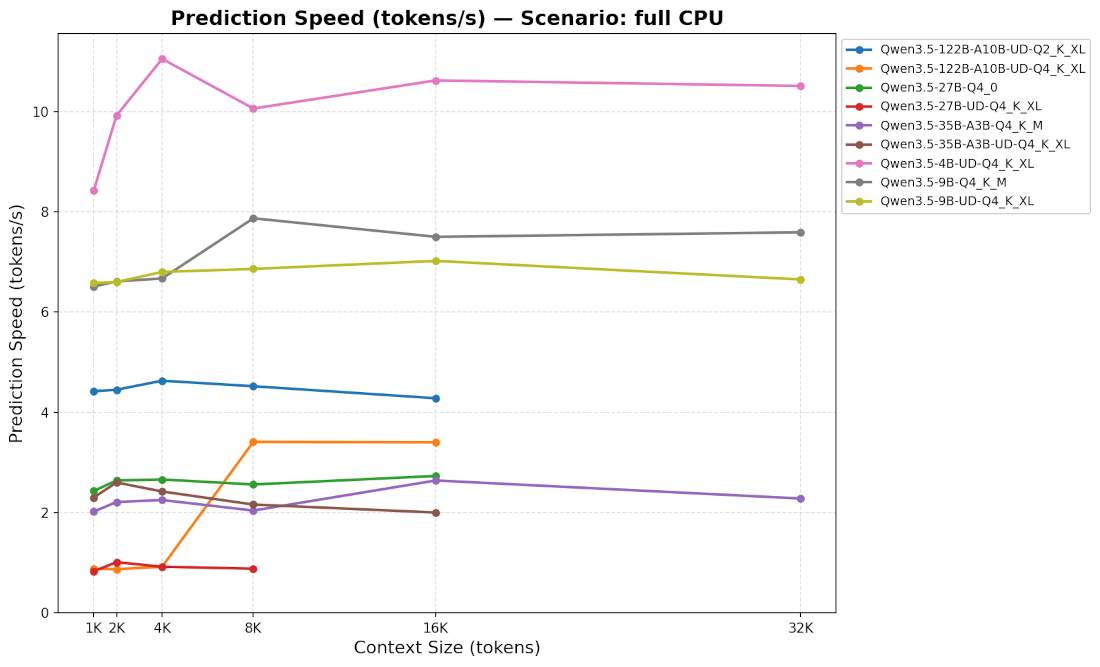
Unsurprisingly, with DDR4, it’s slow. Even the 4B model is barely usable.
With DDR5, the 4B and 9B would probably be usable, and amusingly, a 122B MoE in q2 might be usable too.
All others (≥27B and ≥q4) are simply unusable.

Prefill
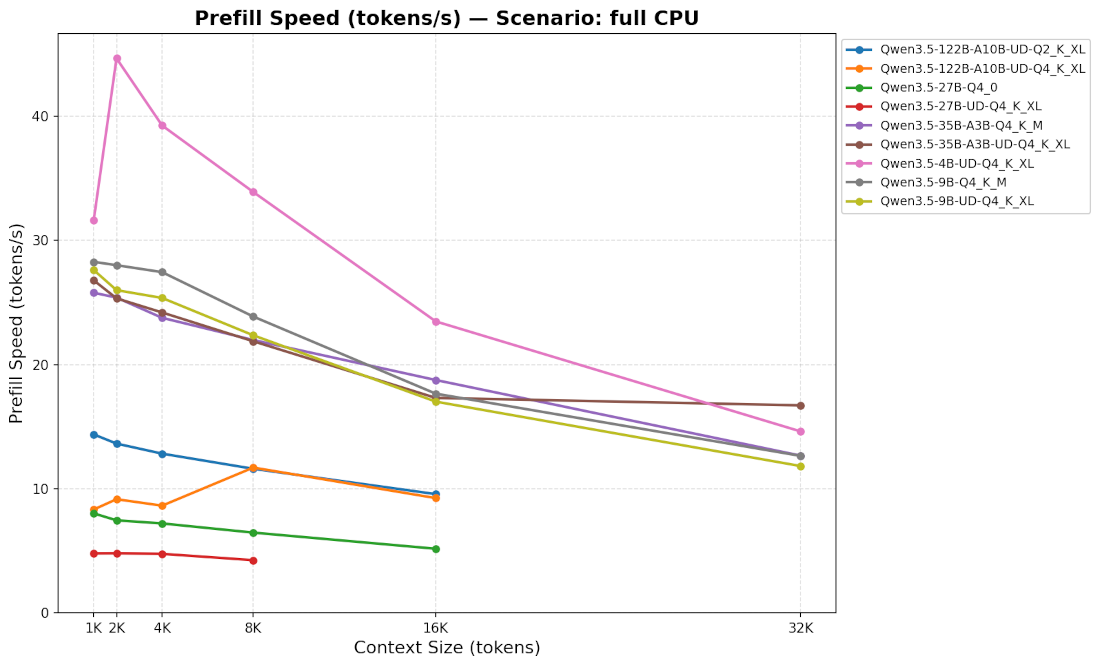
First observation: it’s much slower than on GPU (and water is wet).
Second observation: speed also drops as context size increases. Except we start very low, so this drop hurts even more.
You’ll notice I didn’t test beyond 32K contexts. This is because it was horribly slow, and I actually have a life (yes, I swear).
In practical use, with Qwen 3.5 4B, 27B, and 35B A3B, it would look like this:
| Tokens | Avg Speed | Estimated Time | ||
|---|---|---|---|---|
| Home Assistant | 2500 | 1m 40s | ||
| MoE A3B | 25.5 | |||
| Dense 4B | 43 | 1m | ||
| Dense 27B | 7 | 5m 20s | ||
| Opencode | 8000 | |||
| MoE A3B | 22 | 6m | ||
| Dense 4B | 34 | 4m | ||
| Dense 27B | 6 | 20m 30s | ||
| Tool-enabled Open-WebUI | 20000 | |||
| MoE A3B | 17 | 20m | ||
| Dense 4B | 20 | 16m | ||
| Dense | 5 | 1h 10m | ||
| 100-page PDF | 45000 | |||
| MoE A3B | 16 | 45m | ||
| Dense 4B | 7 | 1h 40m | ||
| Dense 27B | 3 | 4h | ||
| Session Resume | 64000 | |||
| MoE A3B | 16 | 1h | ||
| Dense 4B | 6 | 3h | ||
| Dense 27B | 3 | 6h 30m |
And here we realize that even the small models are unusable.
Objective Conclusion
Unless you have the patience of a Buddhist monk, it’s obvious that this is just unusable. And in this case, even the best DDR5 won’t save you.
On a Single Nvidia RTX 3060 12GB, with Offloading
On an RTX 3060 12GB card, most good models don’t fit in VRAM. But we can offload them to RAM: I asked llama-bench to put certain model layers in VRAM (-ngl) and the rest in RAM.
Now we’re getting closer to what’s being sold on social media.
Prediction
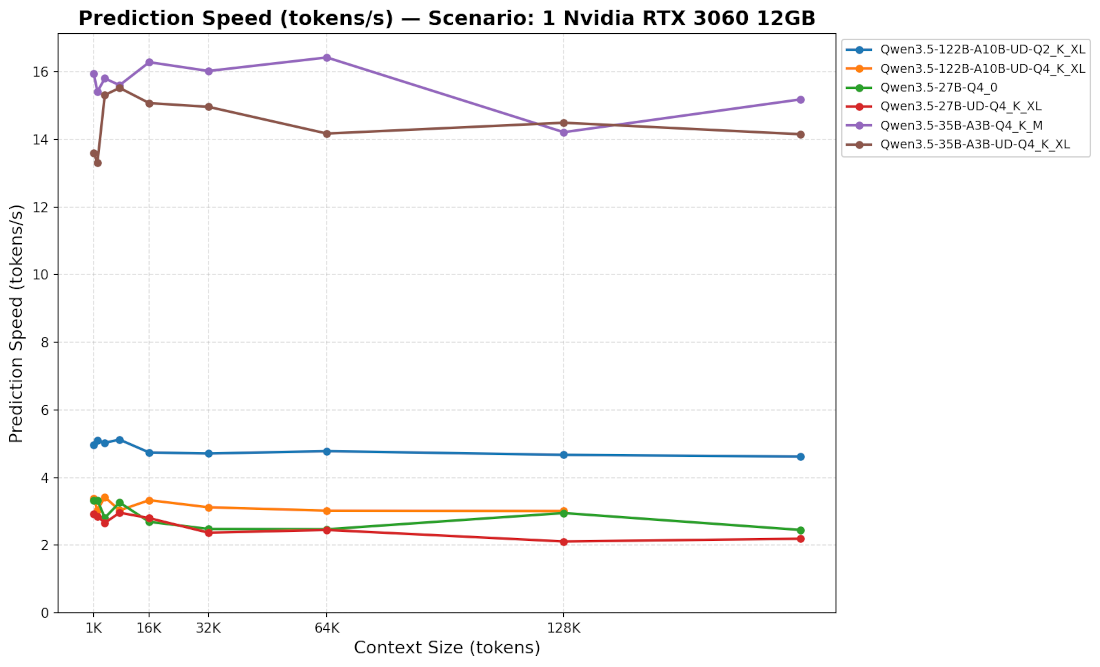
Exclusively in MoE 35B, we reach something usable, but not really comfortable. Dense models and the 122B are simply unusable.
Prefill
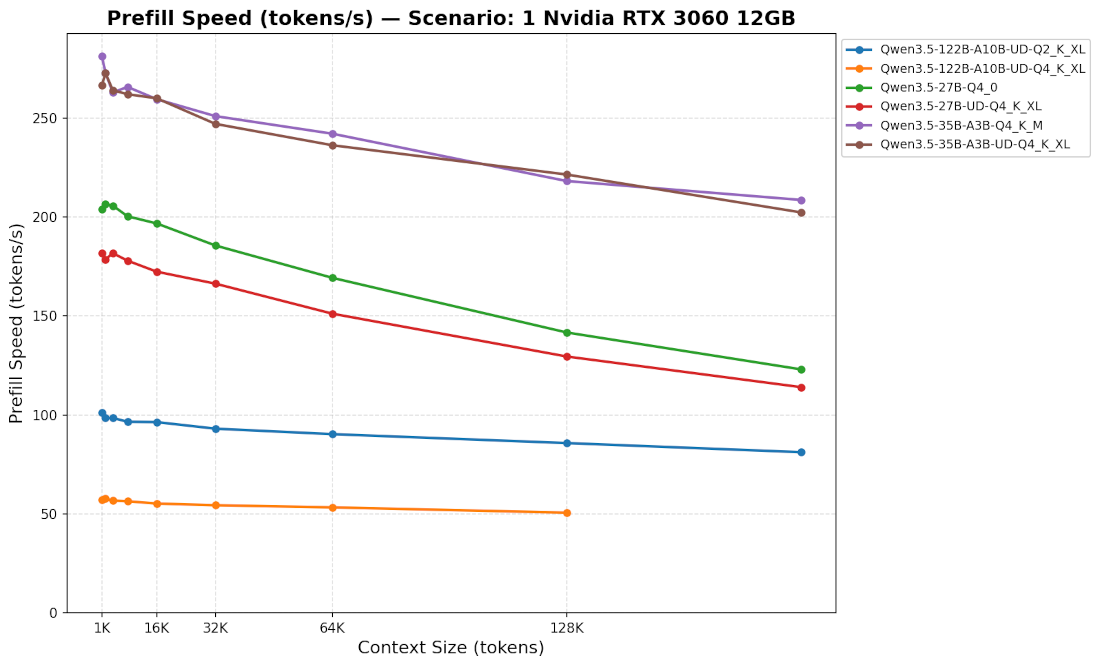
The speed also drops, but significantly less. In fact, it’s almost stable. Which is good, because it starts quite low.
In practical use, with Qwen 3.5 27B and 35B, it looks like this:
| Tokens | Avg Speed | Estimated Time | ||
|---|---|---|---|---|
| Home Assistant | 2500 | |||
| MoE | 270 | 9s | ||
| Dense | 190 | 13s | ||
| Opencode | 8000 | |||
| MoE | 265 | 30s | ||
| Dense | 190 | 40s | ||
| Tool-enabled Open-WebUI | 20000 | |||
| MoE | 255 | 1m 15s | ||
| Dense | 180 | 1m 50s | ||
| 100-page PDF | 45000 | |||
| MoE | 245 | 3m | ||
| Dense | 165 | 4m 30s | ||
| Session Resume | 64000 | |||
| MoE | 240 | 4m 30s | ||
| Dense | 160 | 6m 30s |
Subjective Conclusion
We’ve reached something that is sometimes usable, but really not comfortable.
With DDR5, we can hope for nicer, usable results that are significantly closer to being comfortable.
On a Single Nvidia RTX 3060 12GB, with Offloading and --cpu-moe
llama-server has a very handy option: --cpu-moe. As the name suggests, this option is reserved for MoE models. With this option, only the router part, attention layers, etc., are loaded into VRAM. The experts remain in RAM. The idea is that all the experts combined are the most VRAM/RAM-hungry part of the model. But individually, each is relatively small, and the CPU can potentially handle them. In short, at first glance, an excellent compromise.
Note that there is also the --n-cpu-moe X option, which allows loading additional layers into VRAM. But you have to optimize this manually for each model and hardware setup. Let’s just say that would have been too tedious for this article.
Prediction
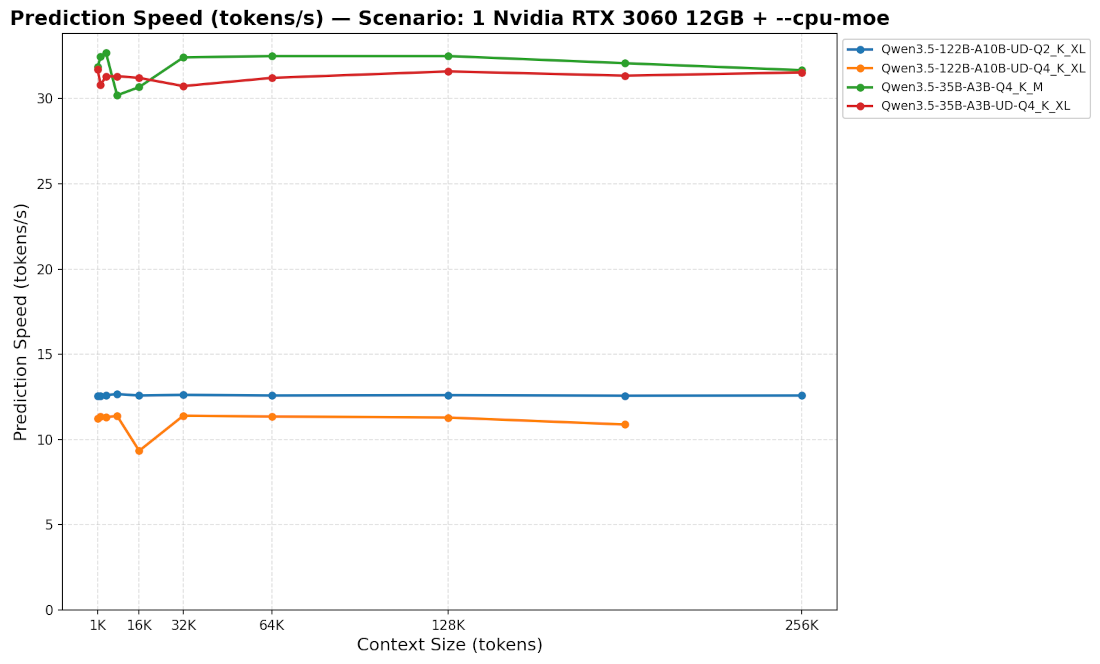
We are 2 to 3 times faster. In MoE, it’s finally comfortable to use.
In other words, the gain is clear 🎉! Here we go! We’re saved! The promised land of social media! We’ll finally be able to cancel our Claude subscription and burn down the datacenters of cloud LLM companies before they destroy our planet! And all without investing thousands of euros in hardware!
Cherry on top: the 122B looks usable 🎉!
Prefill
Ah, but damn, we still have this prefill issue. Well, just like for prediction, it’s probably 2~3x faster, easy, right?
Well, no 😭.
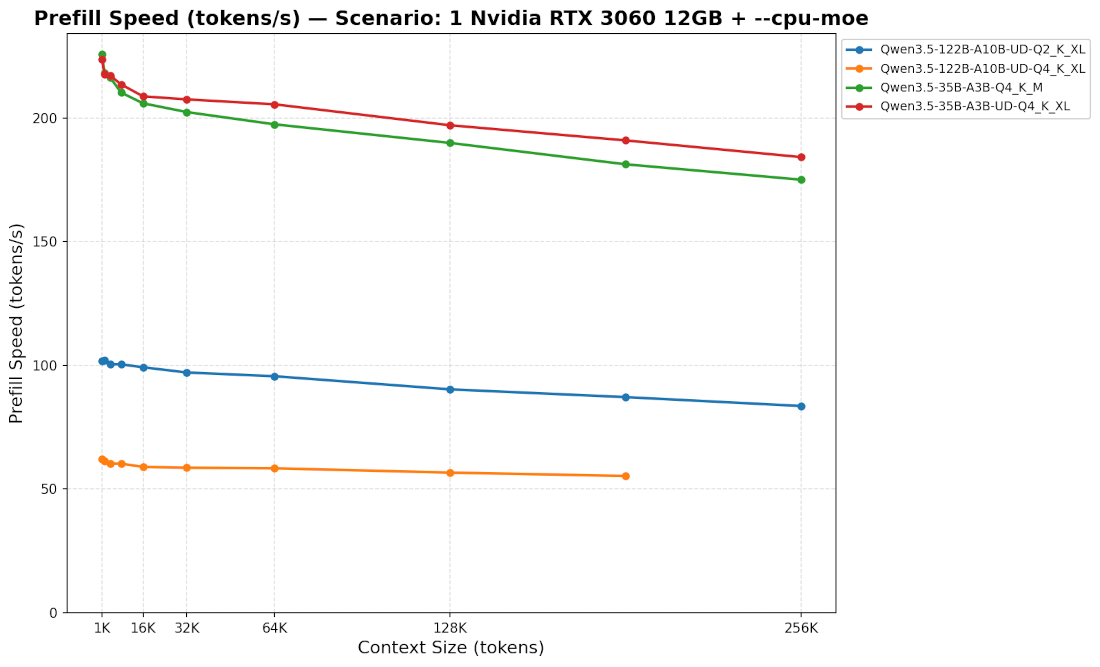
The 35B is actually slightly slower! And the 122B is actually still pretty much unusable 😭.
Added 2026/08/28:
But wait …
On a Single Nvidia RTX 3060 12GB, with Offloading, --cpu-moe, and batch sizes
Added 2026/08/28:
A friendly Reddit user, /u/draetheus, pointed out that I forgot about fine-tuning --batch-size and --ubatch-size. And to my surprise, it actually changes entirely the prefill results (with my luck, of course it does … 🫠).
Fine-tuning --batch-size and --ubatch-size must be done specifically for your hardware. Note that if you always have only one LLM running at a time, you can just set the same value for both parameters.
Overall, the bigger the value, the faster prefill will be, but then it will require more VRAM. For instance, it is likely to be why, in his video, with its 6GB of VRAM, Codacus didn’t mention those settings explicitly, and only set them to 1024 (arguments -b and -ub).
Now with a RTX 3060 12GB, we can set those values much higher. Here are the results for a context size of 32K :
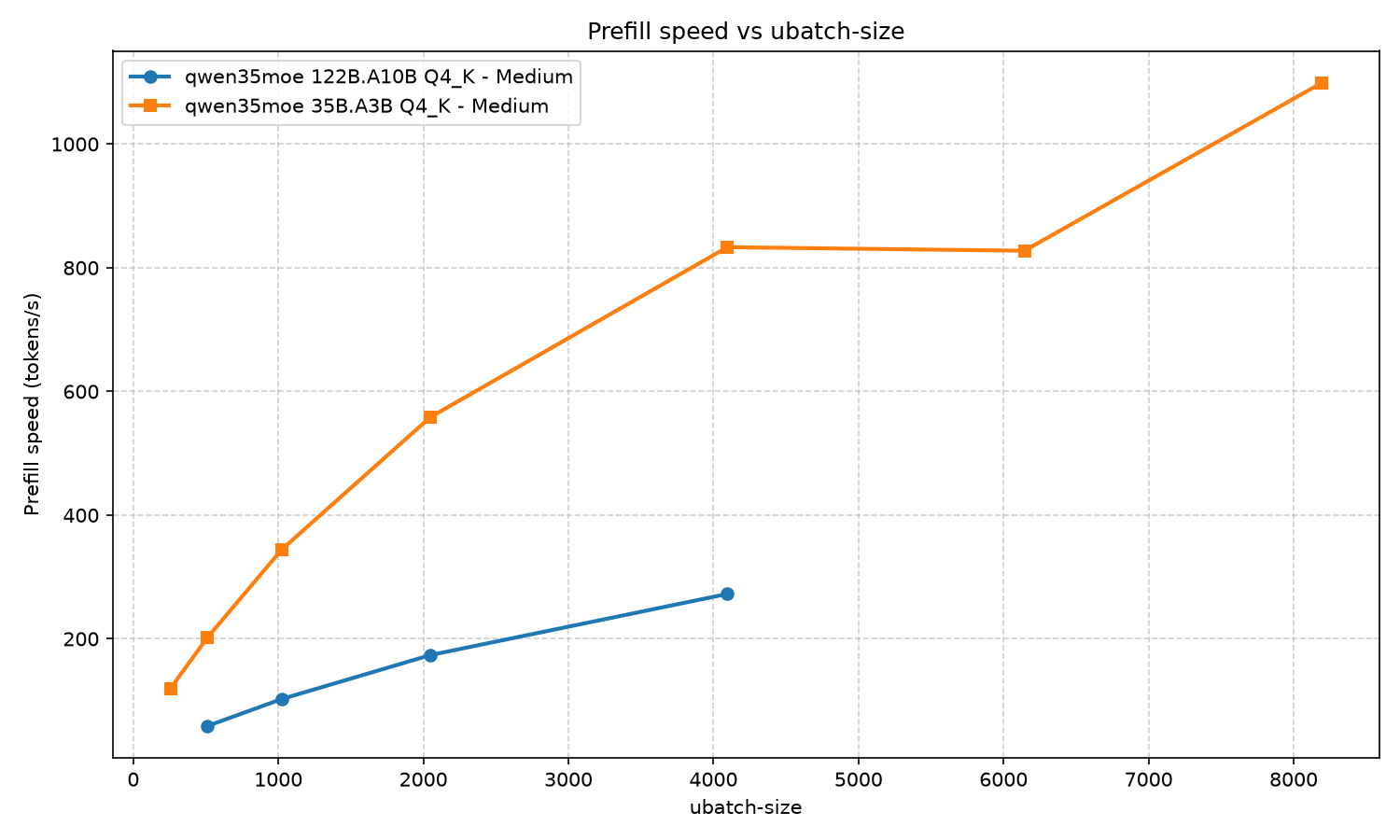
Now let’s assume the only real difference between a GTX 1060 6GB and a RTX 3060 12GB is the VRAM and that the GTX is a fast as the RTX otherwise (which is of course false, but bear with me). For real use cases, here is how it would go down :
| Tokens | Avg Speed | Estimated Time | |||
|---|---|---|---|---|---|
| Home Assistant | |||||
| ub = 1024 | |||||
| 35B-A3B | 2500 | ≥ 344 | 7s | ||
| 122B-A10B | 2500 | ≥ 100 | 25s | ||
| ub = 4K/8K | |||||
| 35B-A3B | 2500 | ≥ 1100 | 2.3s | ||
| 122B-A10B | 2500 | ≥ 270 | 9s | ||
| Opencode | |||||
| ub = 1024 | |||||
| 35B-A3B | 8000 | ≥ 344 | 24s | ||
| 122B-A10B | 8000 | ≥ 100 | 78s | ||
| ub = 4K/8K | |||||
| 35B-A3B | 8000 | ≥ 1100 | 7s | ||
| 122B-A10B | 8000 | ≥ 270 | 30s | ||
| Tool-enabled Open-WebUI | |||||
| ub = 1024 | |||||
| 35B-A3B | 20000 | ≥ 344 | 1m | ||
| 122B-A10B | 20000 | ≥ 100 | 2m 15s | ||
| ub = 4K/8K | |||||
| 35B-A3B | 20000 | ≥ 1100 | 18s | ||
| 122B-A10B | 20000 | ≥ 270 | 1m 10s |
You can figure out the best batch sizes for your setup with llama-bench. For instance:
|
|
If llama-bench says it’s unable to load the model, it most likely means you are short on VRAM.
Subjective Conclusion
Updated 2026/08/28 :
Contrary to what some say, whatever you do, a GTX 1060 is not going to be good enough for agentic programming or any other task requiring real intelligence.
However with a single not-too-expensive GPU like the RTX 3060, while big MoE (≥122B A10B) are pretty slow, 35B are actually fine. With a bit of VRAM (≥12GB) and DDR4 (≥32GB), you can run a 35B A3B q4_k_xl quite comfortably! However you will have to make a compromise:
- use your VRAM to speed up a lot your prefill (then fine-tune
--batch-sizeand--ubatch-size; higher is better) - or use your VRAM to speed up both inference and prefill, but much less (then fine-tune
--n-cpu-moe; lower is better)
Moreover, obviously, we are strictly limited to MoE models. While they can be useful, they are not as good as dense models with similar sizes, and good ones are harder to find (at this time, Qwen 3.8 27B just got released, but no Qwen 3.8 35B A3B in sight yet).
Models Larger than RAM
Llama.cpp uses the mmap() function by default to load models into RAM. The big advantage of mmap() is that it lets the kernel load data into memory (cache), or not, on demand. Consequently, we could imagine loading MoEs larger than our RAM and letting the kernel automatically swap model chunks between our NVMe and RAM as needed. In theory, it works. But in practice, performance is so degraded that it’s completely unusable. It’s so degraded that I’m not even going to bother providing figures (hey, believe it or not, these damn benchmarks take forever! ).
mmap() and --no-mmap
In fact, use of mmap() is primarily relevant if the model fits entirely in VRAM. It prevents keeping an unnecessary complete copy of the model in RAM. If you have more VRAM than RAM, it also allows loading a model larger than your RAM into VRAM.
If you are offloading to CPU+RAM, I recommend disabling the use of mmap() (--no-mmap). In this case, as the llama-server logs indicate, performance is significantly better without mmap().
On a Single Nvidia RTX 3060 12GB, without Offloading, with Small Models
Small models are dumber, but depending on your use case, they may be sufficient.
Note that none of the small Qwen 3.5 models are MoEs. Anyway, I don’t think that architecture is relevant at these sizes.
Prediction
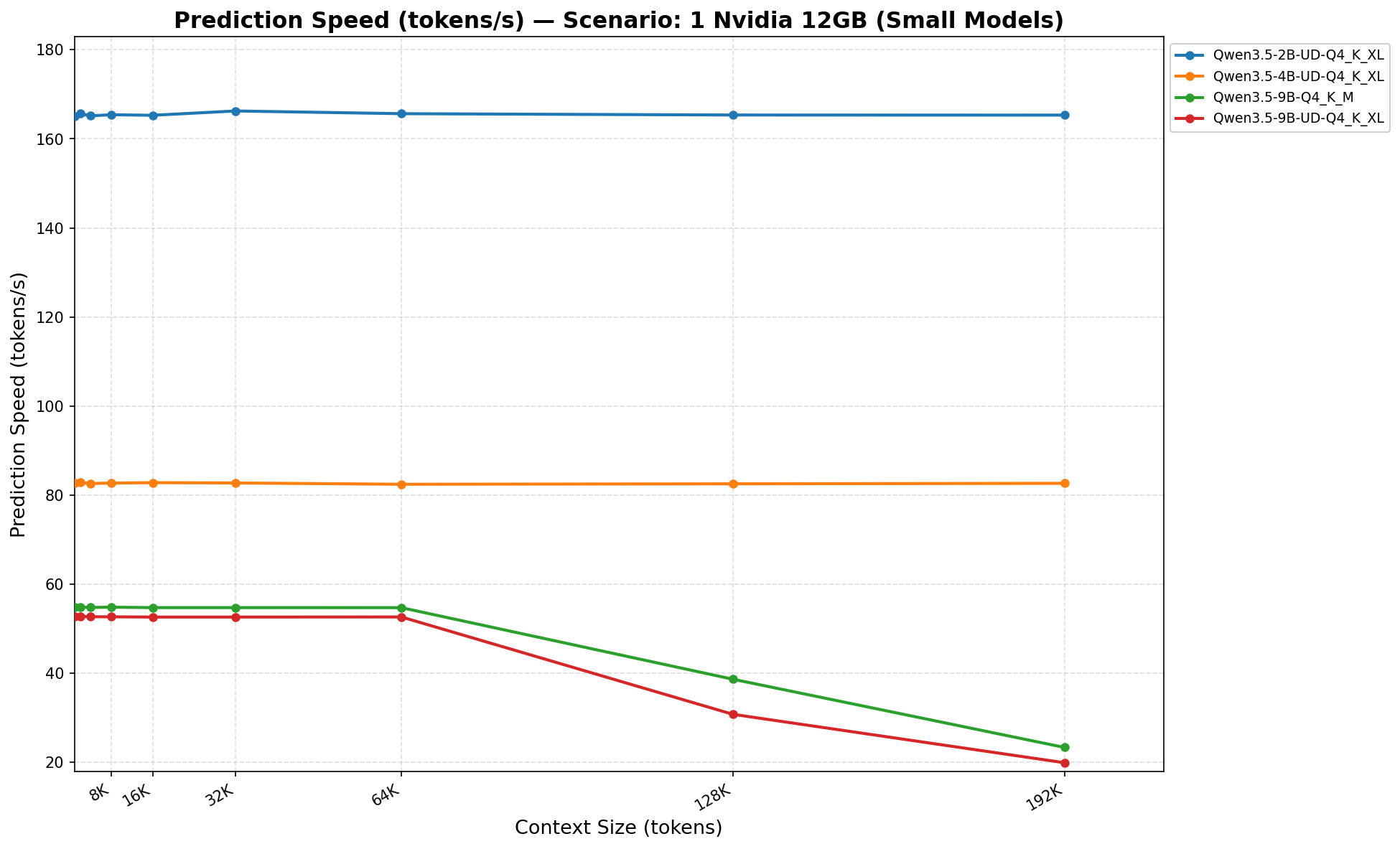
Unsurprisingly, the smaller the model, the faster it goes 🏎️.
On this graph, the speed drops off after 64K: at these context sizes, my benchmark script triggered an overflow into RAM. My script is probably quite pessimistic. There might be a way to fit more layers into VRAM to avoid this drop.
Amusingly, if we enable MTP, the 2B model becomes significantly slower: 110 tokens/s instead of 160 tokens/s.
Prefill
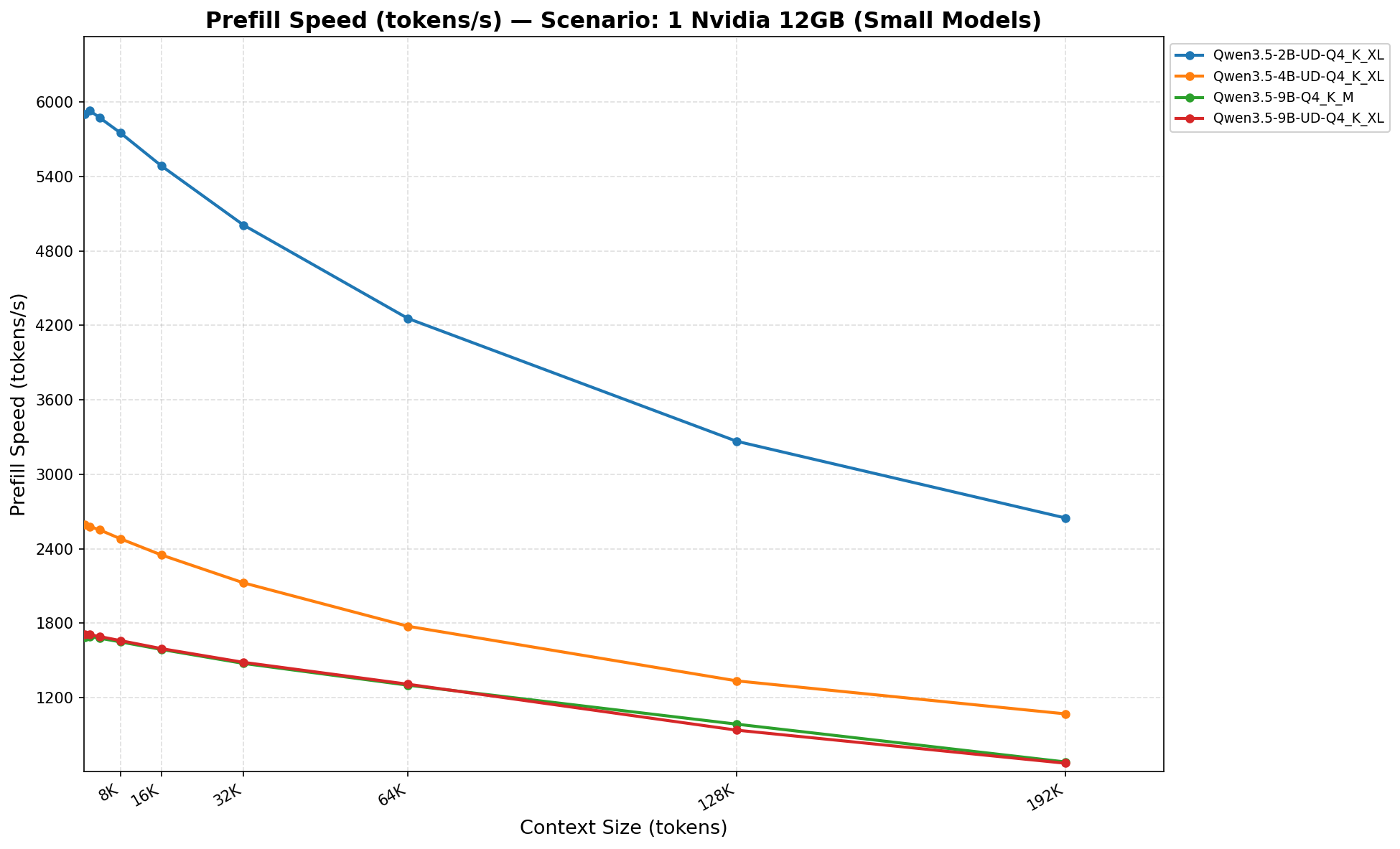
Similarly, the smaller it is, the faster it goes. It’s even ridiculously fast for the 2B ⚡️⚡️⚡️.
| Tokens | Avg Speed | Estimated Time | ||
|---|---|---|---|---|
| Home Assistant | 2500 | |||
| 2B | 5915 | 0.5s | ||
| 4B | 2570 | 1s | ||
| 9B | 1690 | 1.5s | ||
| Opencode | 8000 | |||
| 2B | 5750 | 1.5s | ||
| 4B | 2480 | 3.2s | ||
| 9B | 1650 | 5s | ||
| Tool-enabled Open-WebUI | 20000 | |||
| 2B | 5340 | 3.7s | ||
| 4B | 2280 | 9s | ||
| 9B | 1550 | 13s | ||
| 100-page PDF | 45000 | |||
| 2B | 4650 | 10s | ||
| 4B | 1960 | 23s | ||
| 9B | 1390 | 32s | ||
| Session Resume | 64000 | |||
| 2B | 4280 | 15s | ||
| 4B | 1786 | 35s | ||
| 9B | 1306 | 49s |
In short, for prefill speed, we’re in the clear.
Intelligence
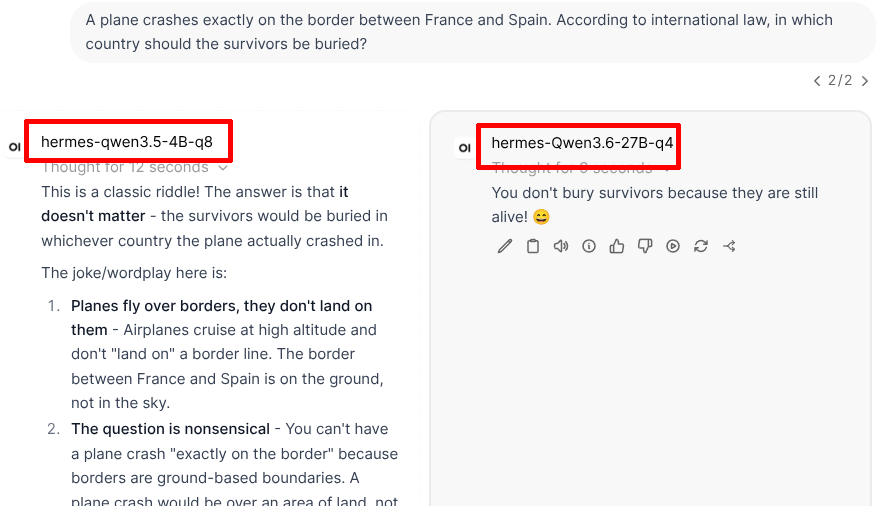
No comment 🤦♂️🤦🤦♀️.
Objective Conclusion
If you’re willing to trade intelligence for speed, taking a smaller model 🤏🧠 is a very effective compromise. However, don’t come complaining if your LLM is dim-witted 📉. Also, for models of this size, I strongly recommend upgrading from q4 to q8, otherwise you’ll be compounding stupidity with hallucinations.
AMD RX 9070 XT 16GB
This graphics card is interesting because it’s a recent consumer card, quite typical, mid-range, and slightly expensive but not too much (around €750 at the time of writing). It has a memory bandwidth of 645 GB/s, which is almost twice as much as the Nvidia RTX 3060 12GB.
For AMD cards, as some mentioned on my previous article, the Vulkan backend is indeed faster than the Rocm backend. These tests were therefore performed with the Vulkan backend.
The AMD card used here only has 16GB of VRAM, so Qwen 3.5 27B and 35B q4 could only be tested with CPU+RAM offloading. To get straight to the point, I only present the results with --cpu-moe here.
Because I am a poor man surrounded by poor people, we are sticking with DDR4 RAM at 3200 MHz everywhere.
Thanks to my friend Quarby for letting me monopolize her machine for 2 days straight for these benchmarks 😁.
Prediction
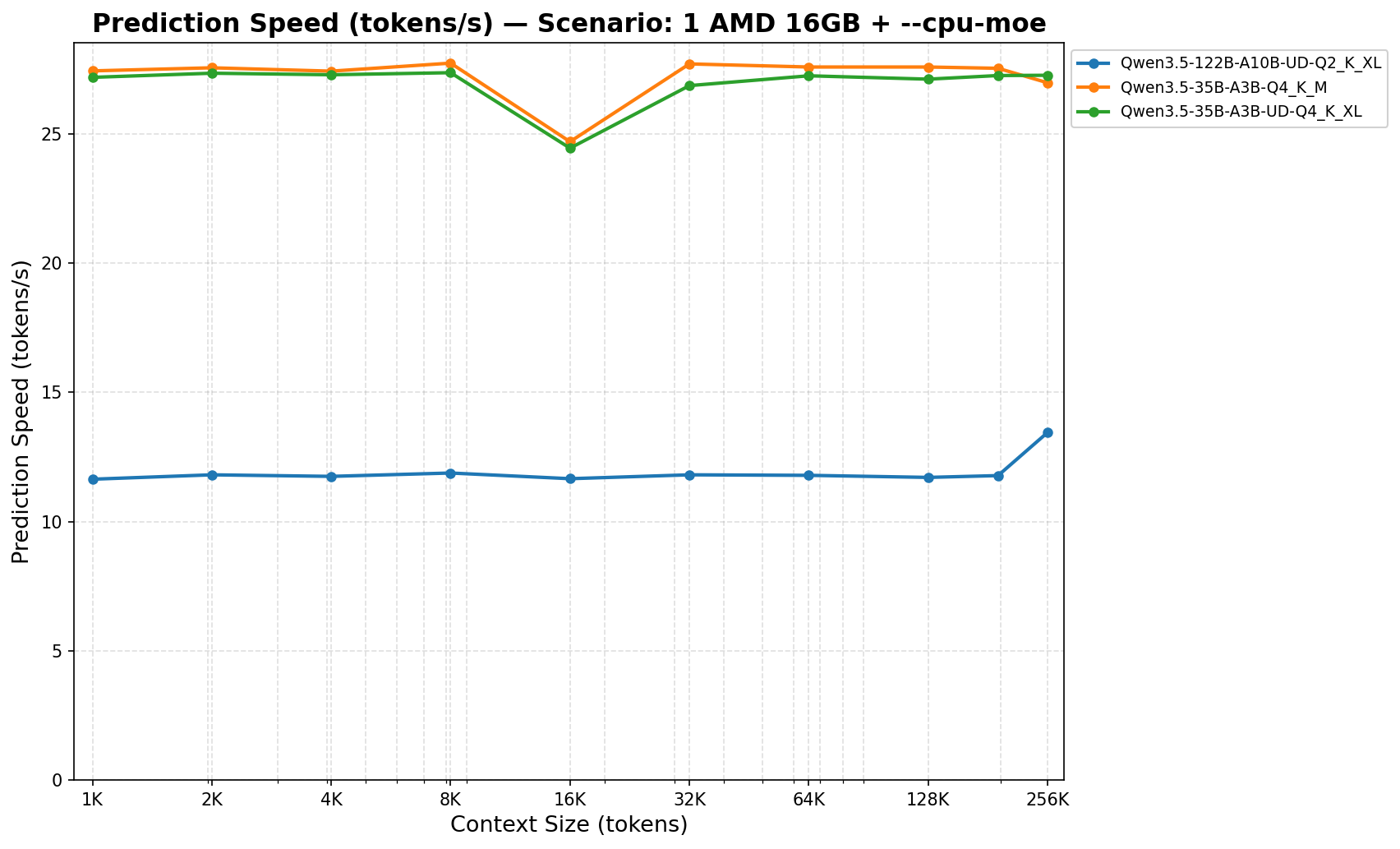
It is materially much faster than the Nvidia card, yet the prediction speed is slightly below that of the Nvidia RTX 3060 12GB. This is actually more or less normal: using --cpu-moe means the bottleneck becomes the CPU and RAM more than the GPU. Unfortunately, I wasn’t able to monitor the card during the benchmark, but I’m willing to bet it was bored to death. Consequently, with identical RAM, having similar performance is no surprise. The fact that we’re slightly below Nvidia possibly stems from poorer software stack optimization.
Prefill
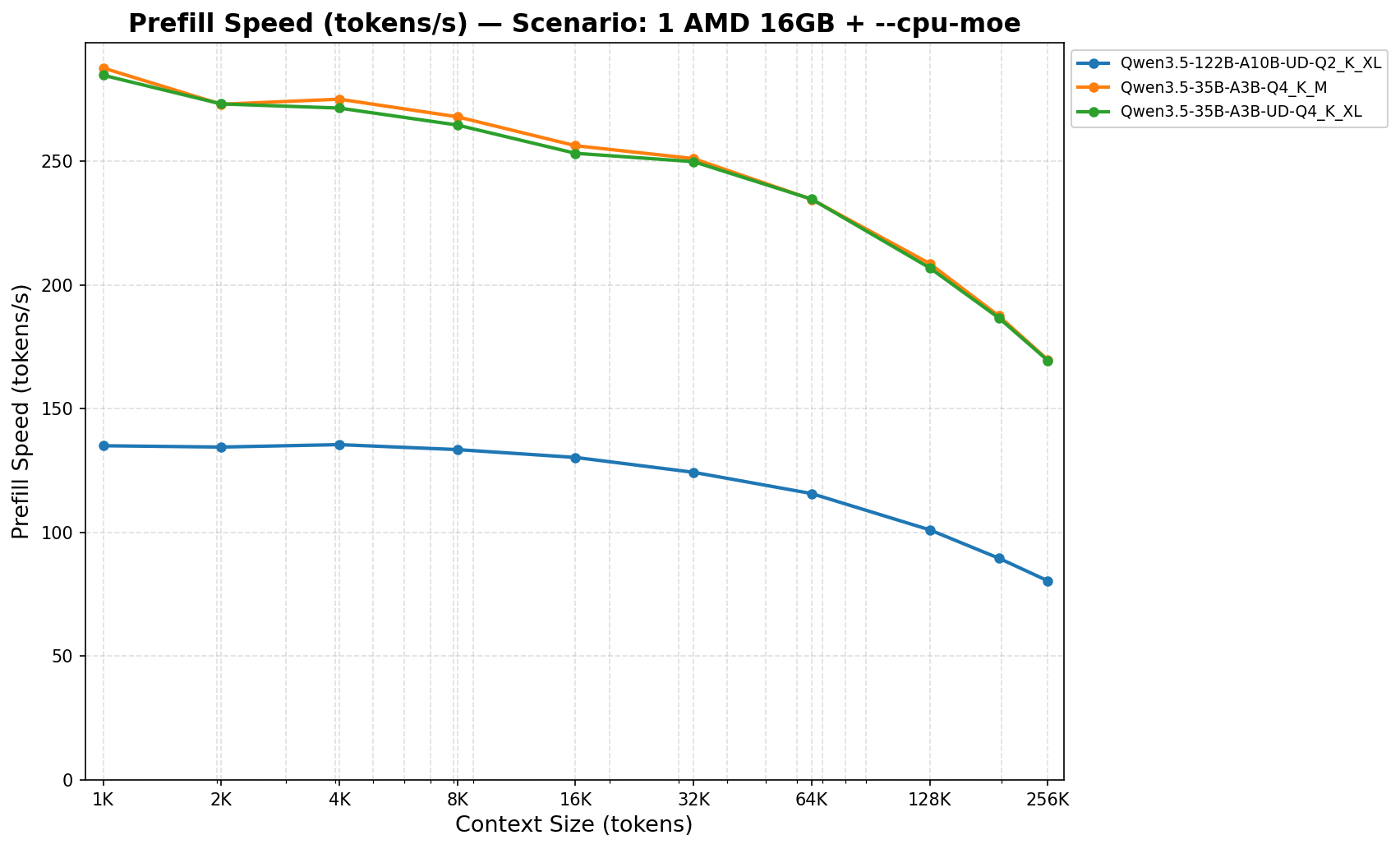
Here, it’s a tad faster than the Nvidia RTX 3060.
In practical use, with Qwen 3.5 35B, it looks like this:
| Tokens | Avg Speed | Estimated Time | ||
|---|---|---|---|---|
| Home Assistant | 2500 | 270 | 9s | |
| Opencode | 8000 | 265 | 30s | |
| Tool-enabled Open-WebUI | 20000 | 255 | 1m 20s | |
| 100-page PDF | 45000 | 245 | 3m 5s | |
| Session Resume | 64000 | 235 | 4m 30s |
Added 2026/08/28:
Keep in mind I haven’t fine-tuned --batch-size and --ubatch-size here! So those estimated time can be greatly improved (up to x3 faster!).
Subjective Conclusion
Updated 2026/08/28:
If you fine-tune --batch-size and --ubatch-size, you can probably increase drastically the prefill speed. It would then make a 35B A3B perfectly usable.
Moreover, as mentioned before, the way I did those benchmarks made it very hard to use --n-cpu-moe instead of just --cpu-moe, so I didn’t do it. However here, since this card has more VRAM than the Nvidia one, you should play with --n-cpu-moe to load more layers into VRAM. By tweaking this parameter, it’s probably possible to obtain slightly better prediction results than on the Nvidia RTX 3060 12GB. That said, from experience with this option, you shouldn’t expect extraordinarily better results. As long as there is offloading, the bottleneck will remain the CPU and RAM.
Intel Arc Pro B60
The Intel B60 (as well as its big sister, the B70) is a recent card with an unbeatable price/VRAM ratio (€750 for 24GB), but it is slower than its AMD or Nvidia competitors.
This card boasts a memory bandwidth of 450 GB/s, which is more than an Nvidia RTX 3060 (360 GB/s) but significantly less than the AMD RX 9070 XT. With its 24GB of VRAM, the Qwen 3.5 27B and 35B q4 models fit entirely on it. We could therefore expect quite honorable performance.
Based on my experience, if you opt for this card, you must know one specificity: Intel cards use Unified Shared Memory (USM). In other words, data in RAM and VRAM are swapped automatically and transparently. So you can give llama-server options -ngl 999 -fit off, and it will tell you everything fits in VRAM, but in reality, it overflows. This overflow will be felt just as much on performance as with classic llama.cpp CPU+RAM offloading. It can even be worse.
The backend used here is Sycl. I briefly tested the Vulkan backend with this card, and the performance was 2 to 3 times worse.
We are still on DDR4 3200 MHz.
Prediction
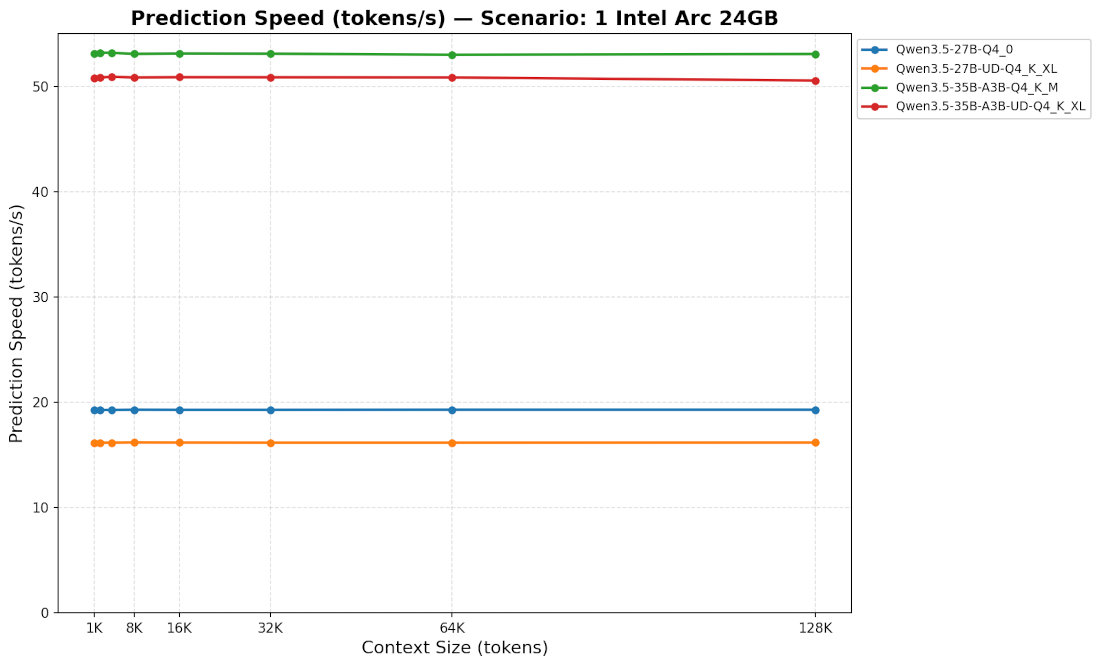
Prediction speed on the B60 isn’t amazing. Usable, but not great.
Note that MTP can improve this speed (around 20 tokens/s for Qwen 3.6 27B q4).
With the --cpu-moe option, it’s slightly slower than the AMD card tested previously (slightly less than 25 tokens/s vs slightly more than 25 tokens/s). But since it can fit models entirely in its VRAM, it takes the lead.
Prefill
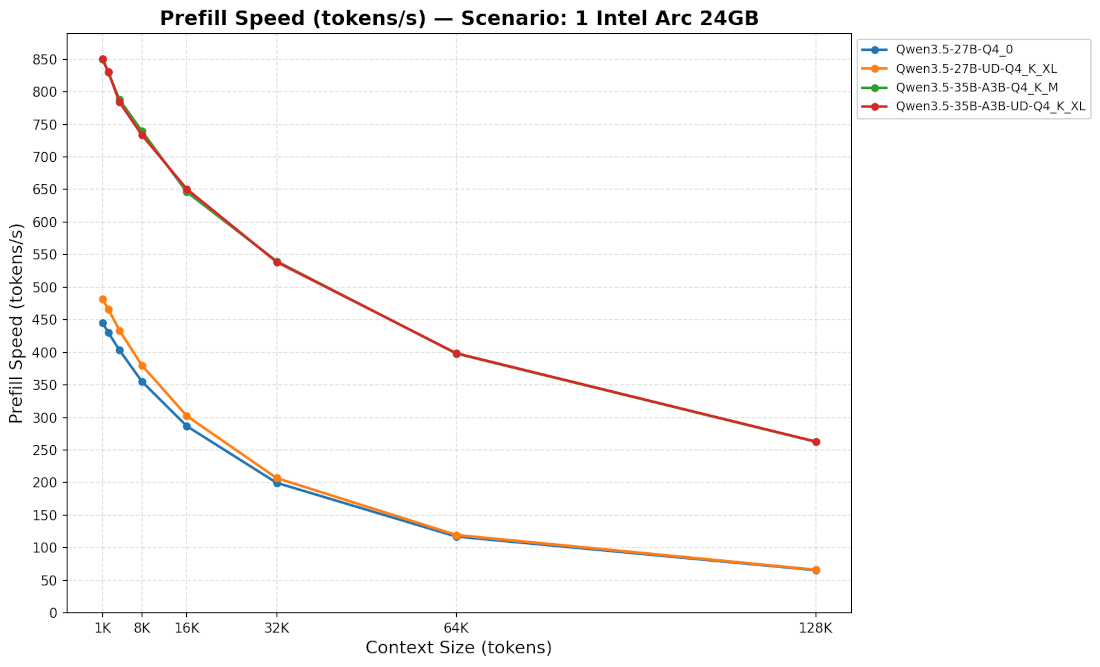
Meh. The B60 starts off not too badly, but performance drops as context size increases.
In practice, it looks like this:
| Tokens | Avg Speed | Estimated Time | ||
|---|---|---|---|---|
| Home Assistant | 2500 | |||
| MoE | 820 | 3s | ||
| Dense | 450 | 5.6s | ||
| Opencode | 8000 | |||
| MoE | 740 | 11s | ||
| Dense | 380 | 21s | ||
| Tool-enabled Open-WebUI | 20000 | |||
| MoE | 550 | 35s | ||
| Dense | 280 | 71s | ||
| 100-page PDF | 45000 | |||
| MoE | 400 | 1m 50s | ||
| Dense | 200 | 3m 45s | ||
| Session Resume | 64000 | |||
| MoE | 360 | 3m | ||
| Dense | 180 | 6m |
For info, when tested with the --cpu-moe option, these performances remain similar to those of the AMD card tested previously.
Subjective Conclusion
Since we aren’t offloading, unsurprisingly, we gain several advantages:
- Performance is significantly better than with an Nvidia RTX 3060 12GB with offloading.
- It’s nice not to be limited only to MoEs.
- We aren’t dependent on RAM speed. Coupled with this card, an undercooked potato with DDR3 might suffice.
- Intel drivers and a large part of the stack are open source. However, the card firmware and parts of the oneAPI are still missing.
But we have to admit, it’s not extraordinary either. We remain somewhere between usable and comfortable.
I have a feeling we could expect more from this hardware. Consequently, several questions arise:
- Could the Sycl software backend be better optimized?
- Does the B70, which is more powerful, perform significantly better?
Global Conclusion
It must be kept in mind that prefill speed drops as context size increases. This drop depends entirely on your hardware configuration.
CPU+RAM offloading is usable… for certain specific uses and/or on certain specific hardware (💸…DDR5…💸). Beside that, MoEs can indeed be an interesting option to be more comfortable. In any case, prefill speed cannot be ignored. By omitting it, many publications sell you a dream and potentially mislead you.
We also notice that a Home Assistant assistant requires responsiveness, making it one of the hardest problems to solve with a self-hosted LLM.
Off-topic: mmproj in RAM
An optimization forgotten in the previous article: if, like me, you rarely submit images to your AI, you can keep the mmproj in RAM rather than VRAM with the --no-mmproj-offload option.
Off-topic: Quantization at openrouter.ai
Something interesting:
I had seen rumors that models on openrouter.ai were often quantized, without it being clearly indicated.
Besides that, when I wrote this article, my AI machine was generally monopolized by benchmarks. I therefore temporarily used openrouter.ai + Qwen 3.6 27B. And to my surprise, I found myself in infinite loops (doom loops) several times. From memory, I seem to have had this problem mostly when self-hosting this model in q4, but very rarely in q8.
Curious, isn’t it? 🧐