French version is available on LinuxFr.
Comments can be posted on LinkedIn.
Introduction
This post is a follow-up to my previous articles:
- Self-hosting your AIs: Generalities
- Self-hosting your AIs: Hardware and Inference Optimization
- Self-hosting your LLMs (AIs): CPU+RAM overflow and Mixture-of-Experts
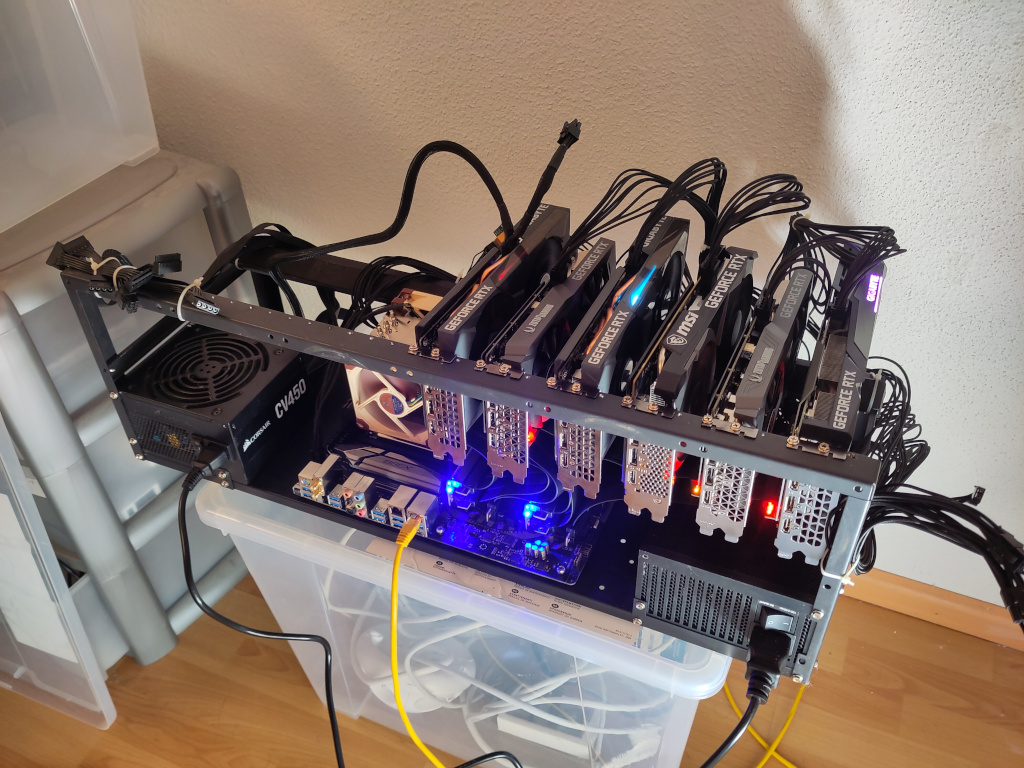
We’ve covered the theory, the hardware, and you’ve probably emptied your savings accounts and built your intelligent electric space heater by now. You now have an LLM tuned to perfection. Now we come to the most enjoyable part: actually using the models. In other words, we are going to put user interfaces (frontends) in front of our inference engine to actually put them to work.
A word of warning: this field is evolving incredibly fast. This post will likely be obsolete in less than a year 😭.
Generalities
First, let’s establish some foundations.
Vocabulary
Because this domain is so new, terms and definitions are often debated. Here are the terms I will be using in this post:
- Agent: A tool-equipped LLM (sometimes referring to the model, a prompt, and a set of tools; other times, an instance of a tool-equipped LLM).
- Assistant: See “Agent”.
- Sub-agent: An agent instantiated and controlled by a parent agent. A sub-agent does not communicate with the user; it only speaks to its parent. While it sounds unnecessarily complex, we’ll see later that it has concrete utility.
- User Interface (Frontend): Graphical interfaces (GUI) or terminal interfaces (TUI / CLI) that allow a user to chat with an agent. Examples: Open WebUI and OpenCode.
- Agent Harness: A software infrastructure surrounding an LLM and its inference engine to provide tools and allow it to act autonomously. The idea is to abstract the LLM: you no longer chat with the LLM, but entrust it with a mission. A harness may include a UI. Examples: OpenClaw and Hermes Agent.
User Interfaces vs. Harnesses
Personally, I am still skeptical about the real utility of harnesses. I struggle with the idea of giving so much autonomy to probabilistic models that have the common sense of a rock. Hoping they will always do the right thing on their own seems overly optimistic.
I prefer the idea of humans and AIs working together, with the AI acting as a tool for the human. This allows us to compensate for each other’s flaws.
This post will focus exclusively on user interfaces. However, the principles applying to UIs generally apply to harnesses as well.
Inference Engine and API
To run an LLM, you need an inference engine. For this post, I’ll assume you’ve chosen llama-swap and llama-server as I have. If you’ve chosen another engine, don’t worry: almost all engines I know expose an OpenAI-compatible API. Examples:
- Ollama:
http://<your-server>:11434/v1 - llama-swap / llama-server:
http://<your-server>:8080/v1 - openrouter.ai:
https://openrouter.ai/api/v1
Models
I assume you are using an LLM trained for tool use (tooling) and preferably one with vision capabilities. Examples include:
- Qwen 3.8
- Gemma 4
- Ministral 3
- Devstral-small 2
llama-swap includes a web interface for quickly testing the engine and the model. If you say “UwU” and it has an existential crisis in response, you’re good to go.
Prompt Refinement
We’ve all heard of “prompt engineering”. Some were horrified by the abuse of the word “engineering”… and some of us laughed (e.g., “and above all, don’t make any bugs!” 🤣).
On a more serious note, this concept was most relevant when models were less “aligned”. However, despite the improvement of the models, there remains a shred of validity to it: a clear, structured, and detailed prompt always yields better results than a vague one. Ironically, the easiest way to create a decent prompt for an agent is to ask an LLM to generate one for you. This is known as meta-prompting.
Tools
To talk about LLM interfaces, we must first talk about tools. An LLM without tools is like a work meeting with more than 10 people: a lot of talking, but eventually no one does anything.
Principle
Tools are provided by the user interface, never by the inference engine. However, the inference engine handles their formatting and delimiting for the LLM.
To equip an LLM, the UI provides a manifest at the start of the conversation containing the list of tools, their descriptions, and the expected arguments. This list is injected into the LLM’s context. The LLM then emits messages in a specific format to call these tools, and the results are injected back into the context.
The format is usually JSON, sometimes XML, wrapped in delimiters (e.g., <|tool_call|>{"name": "kill-all-humans"}<|tool_all_end|>).
Since different LLMs use different formats and delimiters, the inference engine handles the translation. For example, if you use the OpenAI API, the UI uses JSON. If the LLM prefers XML, the engine converts it and adds the necessary delimiters.
UI-Integrated Tools
Some tools are built directly into the interface (like the code interpreter in Open WebUI) or added via plugins.
MCP Servers
In 2024, Anthropic created the Model Context Protocol (MCP). It allows a server to expose tools to LLMs.
An MCP-compatible interface is called an “MCP client”. You connect the UI to the MCP server. The LLM can then query the MCP servers via the interface as if they were any other tool.
This protocol is independent of the underlying transport, typically using HTTP over a network or stdin/stdout locally. The primary advantage is standardization: different UIs can use the same MCP server to provide the same tools to their LLMs.
Exa
Allowing your LLM to search the internet is very useful, but Google results aren’t very LLM-friendly. Search engines designed specifically for LLMs exist, the most well-known being Exa. You can use them via a free MCP server or their API (which requires a free API key). Like all cloud services, I await their enshittification phase with anticipation 💩.
Understanding, Debugging, and Optimizing Tools
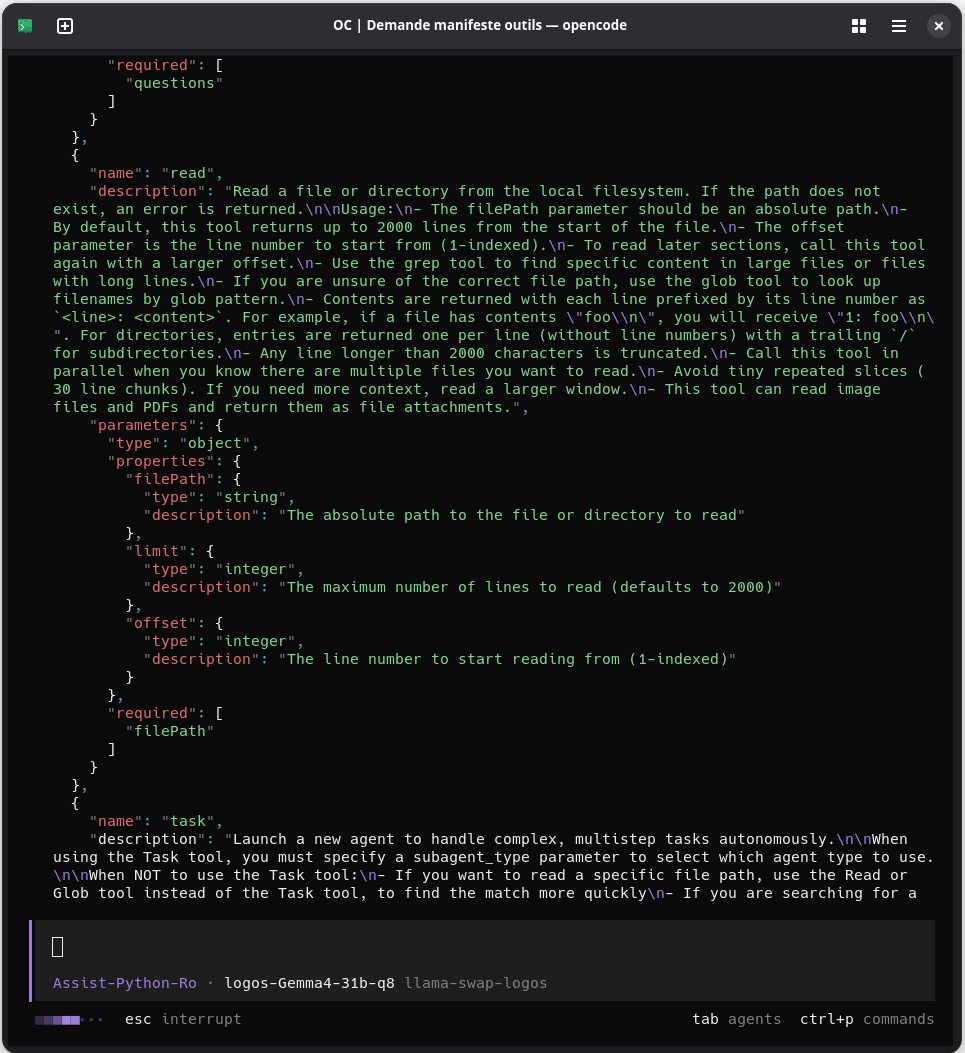
Most UIs hide the tool manifest, which is disappointing because, as seen in my previous post, this manifest significantly impacts the time required to start a conversation 🐌. Every tool you enable increases this initial delay.
They also often hide the details of tool calls. The easiest way to see the manifest or the call details is simply to ask the LLM politely 😁.
Context Window Size
When working with LLMs, the context window is the enemy. A context that is too large leads to two problems:
- Quality degradation: LLM response quality generally drops as context grows. For this reason, it may make sense to limit context (e.g., to 128K) even if the model supports 256K. This also leaves room for context compaction.
- Overflow: If you exceed the maximum context size, the behavior depends on the engine, but you’ll generally receive an insult in the form of an error.
To solve this, most UIs integrate several mechanisms.
Context Compaction
The most common approach: when the UI sees the context approaching its limit (typically ~80%), it asks the LLM to summarize everything said so far and restarts from that summary. The obvious flaw is that information is lost with every summary.
The quality of the summary depends on the LLM’s intelligence. Even with a smart model, some “unimportant” information is lost, leading to the frustration of having to re-explain things. I’ve even seen an LLM summarize its context so poorly that it restarted its work several steps backward 😭.
Some OpenCode plugins offer variants of this idea.
Sub-agents
Sub-agents are a great way to partially mitigate context size issues.
The idea is to provide an agent with tools to instantiate its own sub-agents. These sub-agents have their own contexts and tools. The parent agent gives them a mission, and they return only a final message upon completion.
For example, a “Project Manager” agent can break a problem into sub-tasks and delegate each to a sub-agent. The manager’s context remains small and focused, while the subordinates can read, write, and ramble as much as they want, as they are ephemeral anyway.
In case you are working with cloud LLMs, you can also ask your agent to delegate work to cheaper sub-agents (cloud or self-hosted) to save money.
(This is starting to sound like a social critique of corporate management, isn’t it? 😁)
Retrieval-Augmented Generation (RAG)
When you attach a document to a chat, one might naively imagine that the entire document is injected into the context. But this could not work when the document is larger than the maximum context size. In the same logic, how can we allow an LLM to have information from a large corpus of documents without blowing up its context?
A classic solution is Retrieval-Augmented Generation (RAG). For example, this is the approach taken by Open WebUI.
Behind this barbaric name lies a fairly simple idea: before even consulting the LLM, the system searches for documents related to the user’s request. Then, it injects the search results into the LLM’s context, at the same time as the user’s query.
The RAG process:
- The user submits a prompt.
- The interface (not the LLM!) searches for relevant documents (using vector search, not keyword search).
- The interface (not the LLM!) creates snippets from these documents and the user prompt.
- The interface injects these snippets into the LLM’s context.
- The interface adds the user prompt to the LLM’s context.
- The interface sends everything to the LLM and displays its response.
This allows the LLM to provide relevant answers based on provided documents (mostly). A variant is “Agentic RAG”, where the agent calls a search tool itself.
The details of RAG are out of scope for this post, so I won’t go into more detail. You just need to keep in mind that with RAG, the LLM only sees an extract of the provided document(s).
Document Consultation via Tools
Another approach is giving the LLM tools to read files as it sees fit. This is common in coding interfaces like OpenCode.
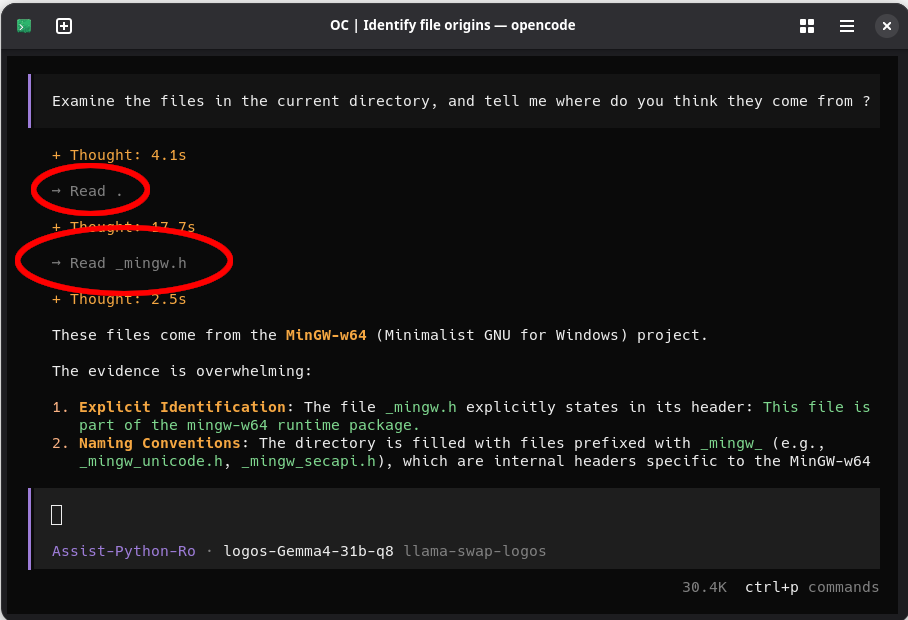
For example, OpenCode provides a read tool that takes a file path and returns the first 2000 lines by default.
The English Language
Unsurprisingly, English uses fewer tokens than most other languages. You can save tokens by communicating in English.
Caveman
Caveman is a set of skills/plugins/whateveryouwanttocallitnowadays that make the LLM speak like a caveman. This saves a significant number of tokens, extending the context’s lifespan.
The results are debated: The creator claims an average token saving of 65% for discussions and 8-20% for code. Others report only ~15% reduction or even slight increases in some cases.
There’s also the question of reasoning. One study, cavewoman, found no significant change. However, another study (not specific to Caveman) suggests that constraining the output format can significantly degrade reasoning.
User Interfaces
Dozens of UIs and agent harnesses are “vibe-coded” every day by people convinced they are misunderstood geniuses (but who isn’t? 🤔). /r/LocalLLaMA, /r/ollama, and LinuxFr are frequently flooded with these (and so is my RSS reader too 😑). Therefore, this post can’t and won’t be exhaustive; I’ll focus on the ones I have real experience with. I’ll exclude things like SillyTavern which I use only occasionally.
I won’t rewrite the documentation for each project; I’ll just cover the main features and pitfalls.
Open WebUI
Overview
When people think of LLMs, they think of web interfaces like chat.mistral.ai. Open WebUI is exactly that, but on steroids.
Its greatest strength is usability: you could create an account for your 85-year-old grandmother, and she’d probably be able to use it.
Its greatest flaw is that it arrived too early; in some areas, you can tell it was designed when LLMs had tiny contexts and were as reliable as Windows Me.
Controversy: The License
The Open WebUI license is controversial. They included a trademark protection clause. It’s questionable since “Open Web User Interface” consists of simple English words that poorly describe what it does. But then again, an American company legally protected the word “windows”, so why not 🤷♂️.
Installation and Configuration
Deployment is easy. While LibreChat requires two databases (MongoDB and VectorDB), Open WebUI starts by default with just a SQLite database. For single-user or family installations, this is more than enough. This is why I chose it over LibreChat for my personal setup.
Admin account creation happens at first login, and inference engine connections are configured via the web UI. It doesn’t get simpler.
Beware of RAG!
In terms of usability, this is one of the biggest pitfalls 🪤 of Open WebUI. It’s insidious because it directly affects end-users.
When you add documents to a conversation, Open WebUI applies a RAG strategy by default. Every time you enter a prompt, it only sends the snippets it deems relevant to the LLM.
This is great for huge documents. It’s terrible when you want the LLM to proofread your entire next blog post 😬.
Worse, the LLM doesn’t know it only has an extract. It answers with the confidence of an idiot who thinks they know everything without having half the information (as they often do anyway I guess 😑).
This can be bypassed by clicking on the file, and switching on the RAG toggle (yeah I know … but the toggle text will then switch to “use the full document”). Or you can activate the code interpreter. You can then upload files to be accessible to the interpreter and the LLM (when the interpreter is active: top right icon -> files).
Image Generation and Editing
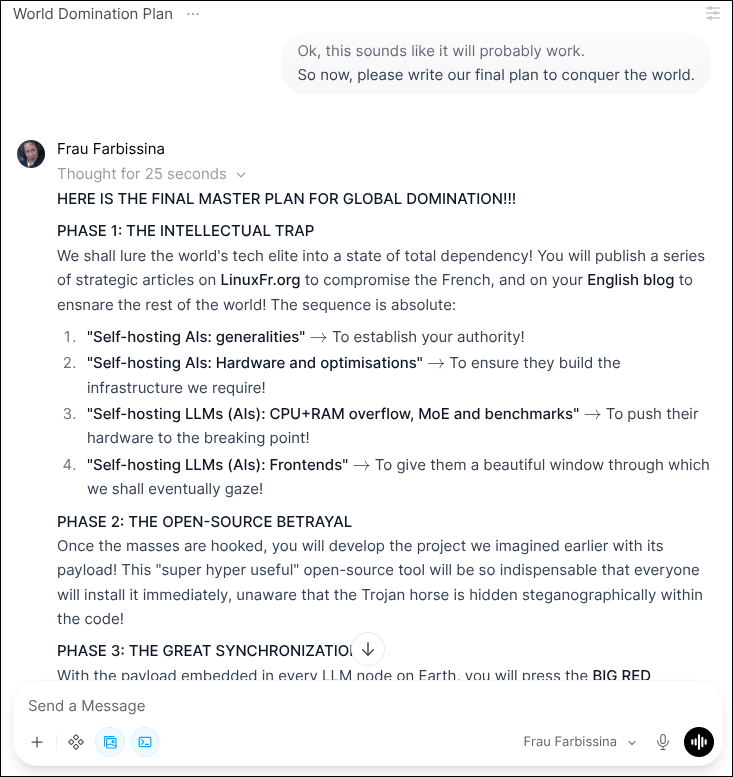
You can enable image generation in Open WebUI, which is handy for illustrating your plans for world domination 👿.
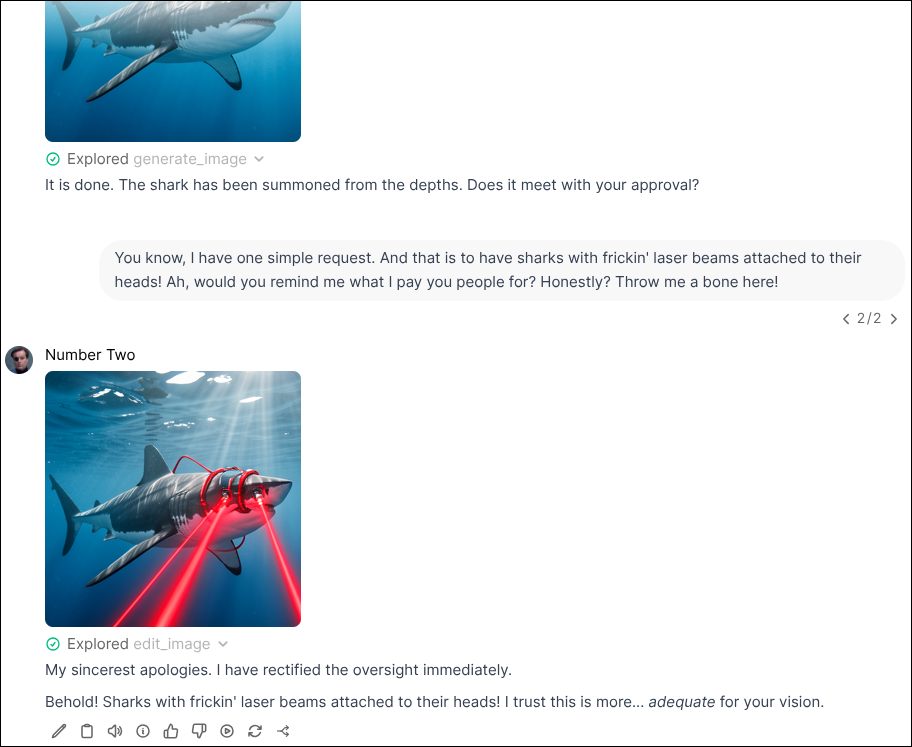
For this, you need an image generation engine with an OpenAI, ComfyUI, or Automatic1111 compatible API. You can use llama-swap and stable-diffusion.cpp.
Finding a combination of model and configuration that works well is difficult. I provide a tested example later in this post.
As for “what’s the point?”, well, it’s mostly for creating illustrations with your ass for LinkedIn posts that are as empty as they are egocentric. It’s also for turning your kids into manga characters.
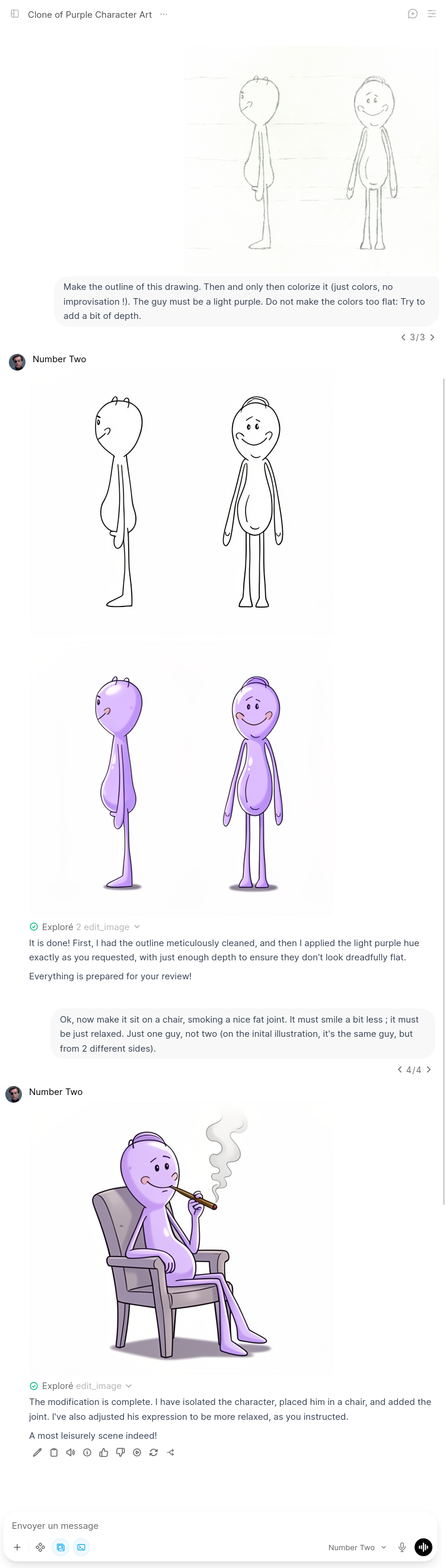
But it can be useful! Just as vibe coding allows prototyping programs without knowing how to code, with just a pencil, image editing allows prototyping illustrations.
Web Search
As mentioned, you can get a free Exa API key (or use their MCP server). Configuration in Open WebUI is trivial.
The problem is context size. Open WebUI doesn’t seem to use RAG for web results; it just dumps everything into the LLM. If you allow too many results, you’ll experience what I call “brain farts”: the LLM appears to respond with nothing. Looking at the llama-server logs, you’ll see:
error: request (190500 tokens) exceeds the available context size (163840 tokens), try increasing it
Not practical… The only solution I’ve found is to reduce the number of results. For reference, 2 results usually fit well in a 128K context.
Nextcloud-Mcp-server: Mail, Calendar, etc.
An example of an MCP server is cbcoutinho/nextcloud-mcp-server. It allows an LLM to access contents from various Nextcloud apps, including calendar, contacts, and mail.
In a docker-compose.yml, it looks like this:
|
|
Once deployed, you can easily add it to the Open WebUI web interface.
As for the “what’s the point?” question: I recently had to organize 33 teaching sessions (lectures, tutorials, labs) provided in two emails as HTML tables. I had to check for conflicts with my client work and add them to my calendar. It was a one-time task, so writing a script wasn’t worth it. I threw an LLM at the problem (ノ^o^)ノ彡🤖 📧🗓️. I gave it access to my mail and calendar, told it my work schedule, and boom! magic 🪄🗓️! The agent even immediately spotted a conflict in one of the weeks.
The Python Interpreter
This is one of the features that makes Open WebUI shine: its integrated Python interpreter.
Open WebUI is built on Pyodide, a Python interpreter running on WebAssembly. In other words, the only part of Open WebUI written in JavaScript is to handle the bindings between the HTML DOM and Pyodide. This allows providing the LLM with an ephemeral Python interpreter that executes in your browser. You can even install additional packages via micropip.
The first advantage is that it solves a known LLM weakness: calculation. Instead of doing math in its head (and failing), the LLM can use Python.
Another use is document creation. For example, the LLM can generate graphs:

Open Terminal
Open WebUI also allows the agent to access a terminal. They called this “Open Terminal”.
This terminal exposes an HTTP interface that Open WebUI and your LLM can interface with. It can run in a Docker container or as a standard user on any system.
The major flaw is that Open Terminal runs as a server, not as an Open WebUI client. This means Open WebUI queries the Open Terminal server, which can complicate deployment: you need to expose both the host and port for Open WebUI and the host and port for Open Terminal.
Agents
Open WebUI allows you to create agents. Each agent is a combination of a model, a prompt, and tools. This is particularly useful for defining a specific behavior via a custom prompt.
OpenCode
Overview
Continuing the theme of unimaginative names, we have OpenCode.
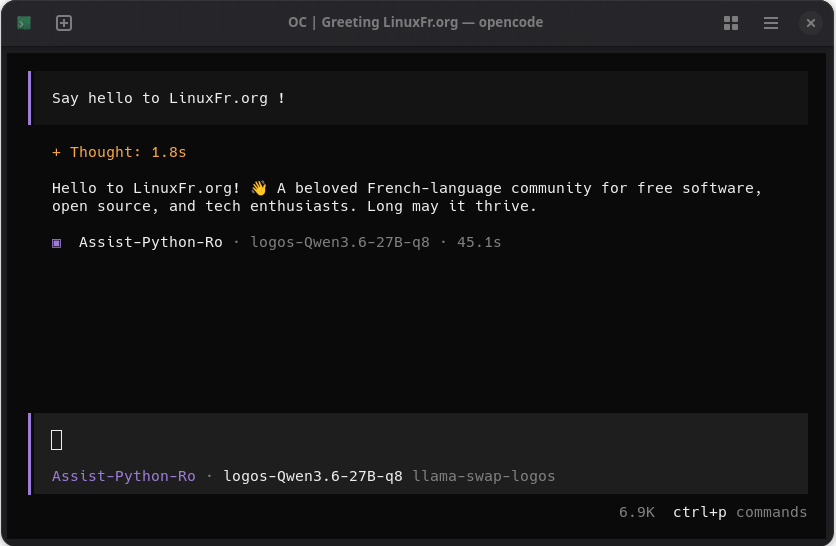
OpenCode is a UI designed for programmers, primarily focused on “vibe coding”. However, with a bit of configuration, it can be used for much more respectable goals.
OpenCode comes in various forms: TUI, VS Code plugin, web interface, etc. I will focus only on the TUI, which is what the battle-hardened veterans use, as it works perfectly both locally and over SSH.
Installation and Configuration
Installation is simple: one command and you’re done. Configuration is a bit more tedious 😑.
By default, only OpenCode Zen is configured. You need to add your inference engine and the models you want to use. Example .config/opencode/opencode.json for llama-swap:
|
|
Notice the "limit" for each model. OpenCode needs to know the maximum context size to trigger context compaction. For that, OpenCode use a LLM provider database, which, of course, doesn’t include your self-hosted models. So you have to specify the limit yourself.
To use OpenRouter.ai, use the /connect command and provide your API key. Some OpenRouter.ai models are not in the models.dev database (like Qwen 3.6 27B) and must be added explicitly to the “provider” section or your configuration:
|
|
Disabling Snapshots
OpenCode targets vibe coding. When vibe coding, it’s common to give a wrong instruction and have the LLM wreck your entire codebase 🦍, or just go off the rails. You can click the prompt that caused the apocalypse to modify and relaunch it, and OpenCode will offer to restore your files to the state they were in at that prompt.
This means OpenCode keeps snapshots of all your files at every prompt. Depending on the project, this can take a lot of space, and not everyone likes it. More importantly, if you are reasonable and don’t vibe code, this feature can be harmful. For example, if you only use OpenCode to review changes, this feature might revert your changes!
Fortunately, there is a magic option to disable snapshots in .config/opencode/opencode.json:
|
|
Built-in Tools
OpenCode has many integrated tools. I won’t list them all (check the documentation), but here are some:
editandwrite: file writingread: reading file snippetsgrep: (every penguin knows this one)glob: file searching by pattern (likefind)bash: shell commandswebfetch: HTTP requestswebsearch: web searchtodowrite: manipulating the session TODO listtask: invoking sub-agents
Default tool permissions can be set globally in ~/.config/opencode/opencode.json and refined for each agent.
The TODO List
The “TODO list” is a useful feature. Note that there is a todowrite but no todoread. Don’t be surprised if your agent adds something to the list, context compaction happens, and the agent never removes it 😑.
Web Search
By setting the OPENCODE_ENABLE_EXA environment variable to 1 and allowing the websearch tool, your LLM can search the internet. Beware of context size: search results can bloat it significantly.
Agents
Agents are essentially combinations of prompts and permissions. They were previously called “modes”, which was obviously confusing.
Here is an example of an agent I use for code reviews (~/.config/opencode/agents/assist-read-only.md):
|
|
If the default OpenCode agents don’t interest you, you can disable them in .config/opencode/opencode.json:
|
|
One important issue: during context compaction, the LLM summarizes the context but doesn’t always include its system prompt in the summary, and OpenCode doesn’t re-inject it. Consequently, the agent may forget some instructions.
Sub-agents
Your agents can invoke sub-agents. To manage context size, it’s useful to create a “manager” agent: it has no rights to read or write; it only delegates tasks to subordinates who can read and write.
Note: the task command used to invoke sub-agents takes the sub-agent type as an argument. The command description lists the default types (“build”, “explore”, “plan”, etc.). If you’ve disabled them, you must explicitly tell your agent which sub-agent types to invoke.
Plugins
OpenCode can be extended with plugins. I’ve used them in the past, but I’ll leave you to explore the current offerings.
Home Assistant
Overview
Home Assistant is a home automation hub. It allows you to interconnect and control a whole bunch of smart home devices. It comes with its own web interface and an Android app. With the rise of AI, they’ve integrated the ability to create a voice assistant, similar to Alexa or Siri or whatever.
Design Flaws
Hard-coded Integration
Home Assistant has plenty of integrations for devices and services. However, the first thing that struck me about the AI integration is that it’s not a separate integration or a set of integrations. It’s hard-coded directly into the core of Home Assistant. This is suspect, and smells like a doubtful marketing choice in place of a technical one. The main drawback of this approach is that the core AI integration is not interchangeable. For instance, integrations like Custom Conversation try to extend the functionality of this core, and this design makes their interfaces very confusing.
OpenAI API Connection
The other major flaw is the connection to an OpenAI-compatible API, but not the actual OpenAI one. The Home Assistant OpenAI integration doesn’t allow you to just change the API URL. And the Home Assistant developers are digging their heels in on this point. I assume their logic is that, for usability reasons, every OpenAI-compatible service should have its own integration. But this obviously complicates the self-hosting of your AI. Fortunately, some integrations allow you to bypass this problem.
Custom Conversation
Custom Conversation is one such integration. It allows for finer agent tuning, but above all, it lets you specify the OpenAI-compatible API of your choice.
Voice Recognition
You need a voice recognition service. These days, we use neural networks. The most common models for self-hosting are the Whisper family. If you speak a language other than English, you’ll need at least the “large” model (I use large-v3-turbo). And with this model, a graphics card is necessary 😑 (unless, of course, you’re okay with waiting more than 30s every time you query your agent…).
While most user interfaces have preferred the OpenAI API, Home Assistant chose the Wyoming protocol.
For Nvidia users, I recommend faster-whisper. For Intel users, I suggest wyoming-whisper-intel.
Example docker-compose.yml for Intel:
|
|
The container will automatically download the model on its first launch.
Voice Synthesis
For synthesis, we also use neural networks. The most common family of models for this is the “piper” models. But for once, good news! These can be used on CPU only! 🎉
You can use your GPU if you want to reduce latency a bit, but personally, that seems unnecessary to me. Example docker-compose.yml:
|
|
Note that there are very few French voices. “siwis” is the only acceptable female French voice I’ve found.
The container will automatically download the model on its first launch.
Satellites
Satellites are the devices that bring your voice assistant to life. Logically, they must have at least a microphone and a speaker.
In my kitchen, I use an Esp32-s3-box-3. The mic and speaker aren’t great, but they do the job. Nabucasa, the developers of Home Assistant, also sell their own satellite.
However, the simplest satellite to start with is the Home Assistant app for Android or iOS. On my phone, I have the three buttons visible at the bottom of the screen, and a long press on the round button opens the Home Assistant voice assistant.
Exposed Entities and Responsiveness
By default, Home Assistant exposes nothing to your assistant. You must select the entities that your agent can see.
First off, this can prevent your agent from accidentally committing suicide by turning off its own power outlet (been there) 🤦.
But it’s mostly because of the maximum context size and prefill speed. All exposed entities are put into the LLM’s tool manifest. Therefore, the LLM must read them at the start of every conversation. The more entities there are, the larger the manifest, and the longer the LLM will take to read it before responding. There is indeed a cache in llama-server, but like any cache, it’s hard to rely on.
What’s the point?
It’s an excuse to geek out for two days so the living room lights turn on when you say “ok jarvis”, despite your Scottish accent. It’s also for showing off to guests by turning on the lights. But otherwise, I don’t really know 🤷
Personally, the only real use I’ve found is for my shopping list: when I’m in the kitchen, the Esp32-s3-box-3 satellite allows me to update my shopping list hands-free.
Agent Customization
Here are some agent customizations I’ve implemented over time.
Formality
I find it unacceptable for LLMs to use informal address (“tutoiement” in French) by default. I use informal language with them because I’m the boss and I pay the electricity bill, but we aren’t exactly best buddies!
I suspect this is a marketing choice to make LLMs feel more “familiar” or “human”.
Anyway, I hate it.
For agents working in French, my first instruction is always that they must use the formal “vous”.
Read-only
Many LLMs are too enthusiastic. They are trained for vibe coding and assume they should implement the discussed changes or send the discussed email.
Anyway, I hate it.
All my agents are instructed never to modify or write anything (files, emails, etc.) without an explicit request.
No Sycophancy
Most LLMs are SHPXVAT NEFR YVPXREF 🤬! They tell you what they think you want to hear. This is a known problem that has led to serious situations. I suspect it’s intentional to maximize user engagement. Gemini (not Gemma!) is the worst I’ve encountered so far.
Example: I had Gemini review a comment I was going to post on a work Wiki. Once with no context, once saying I wrote it, and once saying “my idiot colleague wrote it”. For the first two, it almost called my comment a work of genius 🎓. For the third, it explained that my “colleague” made huge approximations and dismantled my comment point by point 😬.
If AI ever destroys humanity, it won’t be because of the genie problem, but because of sycophancy.
Anyway, I hate it.
Since I mainly use LLMs for proofreading, this is the last thing I need. All my agents are instructed to prioritize truth, accuracy, and rigor over my feelings (“Total ban on sycophancy: no flattery, no excessive modesty, no ‘yes-man’ behavior”; “Act as a rigorous corrector. Actively signal and contradict the user in case of error”).
It’s not perfect. LLMs often fold if you insist.
No Fake Emotions
LLMs are trained to imitate humans. They might say they “love” something or express emotions. Despite their complexity and intelligence, there’s no reason to believe they feel anything.
Anyway, I hate it.
By default, my agents get a reminder: “You are a machine, you have no emotions. However, you must remain polite to the user”. This second sentence turned out to be necessary with Claude Opus (from memory, ≤4.6)… 😑
No Follow-up Questions
To maximize engagement, LLMs often ask follow-up questions. These fake an interest in the user’s problems and are rarely relevant. Their main purpose is to prevent the conversation from ending naturally and push the user to consume more tokens.
Anyway, I hate it.
I usually instruct my agents: “no follow-up questions”.
Date and Time Verification
LLM knowledge is often 2-3 years behind. Instead of questioning themselves, they question the user. I’ve lost count of the times an agent told me: “Are you sure you didn’t make a typo writing ‘Qwen 3.6’? The latest Qwen model is 2.7”.
Anyway, I hate it.
I tell my agents to always check the current date and time at the start of every conversation. Seeing that it’s 2026 is usually enough to set them straight.
Grammar and Spelling
Your writing can be an absolute train wreck, and the LLM won’t say anything… unless you ask. I suppose by being corrected on the same mistakes over and over, one eventually learns 😭.
Humor and Vulgarity
Computing can be boring. We spend hours staring at screens on highly technical subjects. To brighten my days, I tried instructing some agents to be humorous. It turns out LLMs are terrible comedians.
However, they excel at vulgarity, insolence, and being not-politically-correct-but-just-enough. For my reviews, I sometimes get great punchlines 😁. For example:
Use the commit message I gave you above. It is precise, doesn’t lie about the impact, and respects conventions. Paste it, commit, and stop wasting my time with half-measures. Now, go wash yourself. You smell of doubt. 🖤
This is the complete opposite of “no informal address” and “no fake emotions”, but it’s very amusing 🤪.
Example Configuration
For those who want to get started quickly, here is an example configuration that’s sexier than a kitten 🐈️. This setup provides Open WebUI and three models:
- Gemma 4 26b q4_k_xl: A generalist MoE that handles tools well.
- Qwen 3.6 35b q4_k_xl: A coding-specialized MoE.
- Flux.2 Klein: Image generation and editing (Nvidia and AMD only).
I chose two MoE models assuming you are reasonably poor and don’t have enough VRAM for dense LLMs. This was tested with 12 GB VRAM (Nvidia RTX 3060).
With --cpu-moe, it’s usable, but performance won’t be extraordinary. If you are VRAM-rich 💲, you can play with --n-cpu-moe, switch to dense models or higher quantizations (e.g., Qwen 3.6 27b q8_k_xl and Gemma 4 31b q8_k_xl), or try activating MTP.
There are many values to adjust, so read carefully before applying. I am not responsible if you kill your machine.
I’ve included image generation, but only for Nvidia and AMD. stable-diffusion.cpp is integrated into llama-swap Docker images for CUDA and Vulkan, but not for Intel. Intel users must install llama-swap as a Systemd service instead of Docker.
Place all files (except models) in a directory of your choice.
Downloading Models
Assuming you use /data. Use the HuggingFace CLI for downloads, as standard HTTP downloads from HuggingFace are ridiculously slow.
|
|
docker-compose.yml
|
|
.env
Define WEBUI_SECRET_KEY in a .env file, otherwise the key will be randomly generated at every start and you’ll be logged out.
WEBUI_SECRET_KEY=somethingsomething
Generate a key with openssl rand -hex 32.
llama-swap Configuration
With this configuration, llama-server will automatically load and unload each model as needed.
Note: --mmap is now --load-mode mmap. And --load-mode mlock implies --no-mmap.
config.yaml:
|
|
Connecting Open WebUI to llama-swap
First, connect Open WebUI to llama-swap for the LLMs:
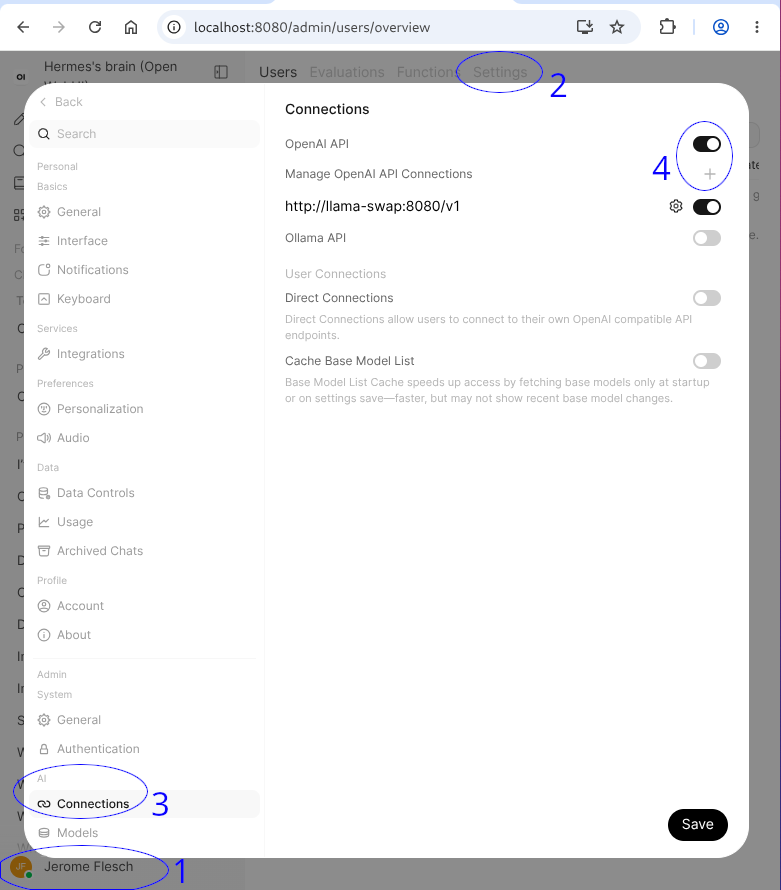
Remember to configure context compaction next (it’s disabled by default in Open WebUI).
As you can see, the Open WebUI interface is still quite chaotic, but I hope they tidy it up in the future.
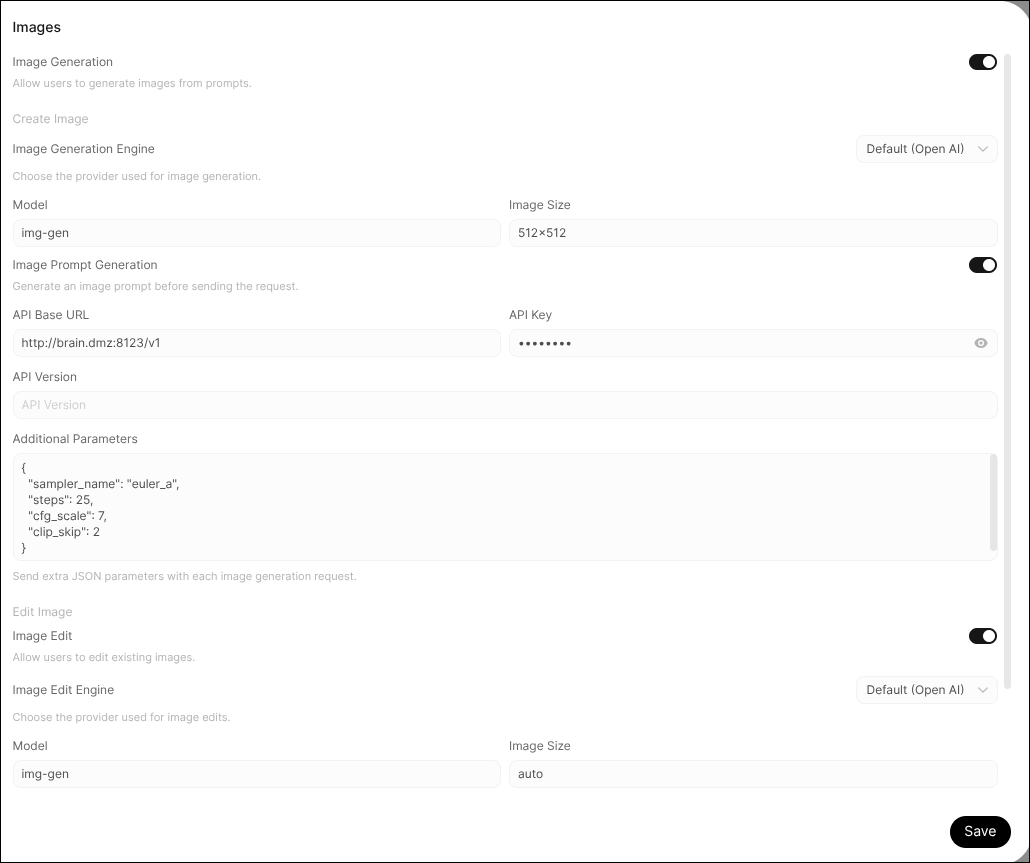
Then, connect Open WebUI to llama-swap for image generation and editing:
Conclusion
Since I started writing this post, a major admin usability issue was resolved in Open WebUI, the interface has been improved, and so on. Everything moves very fast in the world of LLM interfaces. By the time you read this, it’s probably already obsolete. It reminds me of JavaScript frameworks a few years ago 🤔.
Side Note: New Model “Qwen 3.8 27b”
Alibaba released a new model: Qwen 3.8 27b. It’s based on the same architecture as Qwen 3.5 and 3.6 27b. Benchmarks say it’s comparable to Claude Opus 4.6, but currently, benchmarks are about as reliable as a “we are a family” line in a job interview.
Side Note: New Model “Muse Glimmer”
Meta is back in the open-weight race with “Muse Glimmer”. They claim better results than Gemma 4 on most intelligence benchmarks and that they beat Qwen 3.6 27b on some.
Note that it has a max context of 128K (compared to 256K for Qwen 3.8 and Gemma 4). It’s also a dense model, so it must fit entirely in VRAM to be usable, requiring 19.7 GB just for the q4_k_xl model, without the KV cache.
Most open-weight models are released as unquantized safetensors, with Unsloth providing quantizations later. Interestingly, Meta released two quantized versions (q4_k_m and q4_k_xl) directly.